
Best 16GB RAM Laptops for Programming in 2026: 14 Picks by Specs
The Apple 2026 MacBook Air 13-inch with the M5 chip is the top pick here: 16GB of unified memory, 1TB of storage and a 1.23kg body make it a strong choice for a programmer who wants macOS on a laptop that is light to carry. The rest of this list comes from a pool of 60 laptops that state exactly 16GB of RAM, matched to the way programmers use memory, storage and graphics.
14 picks from 140 laptops that match this guide with a price we can quote today. Every price below is live and carries the moment it was read.
The picks at a glance
Which one should you buy?
- For a front-end developer with a browser, an editor and a container open: The 16GB MacBook Air keeps that stack together on a 1.23kg body, and macOS is the operating system Apple targets with its own developer tools. See pick 1
- For a backend developer running local databases and virtual machines: The Lenovo IdeaPad Pro 5 gives you 16GB of memory, a 1TB SSD for database files and virtual machine disks, and a dedicated RTX 5050 GPU if you also experiment with local models. See pick 10
- For a computer science student who carries the laptop between campus and home: A 13.8-inch Surface Laptop at 1.36kg with 16GB of memory, 1TB of storage and a touchscreen covers lectures, labs and side projects without taking over a backpack. See pick 4
- For someone who wants GPU headroom for machine learning and 3D work: The MSI Crosshair 18 HX pairs 16GB of RAM with 8GB of graphics memory and 2TB of storage, enough room for local model experiments and large project files alongside the rest of your toolchain. See pick 13
The 14 picks
1 Lightest pick with a stated weight here
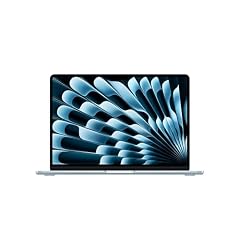
Apple 2026 MacBook Air 13-inch Laptop with M5 chip
- CPU
- Apple M5
- RAM
- 16 GB
- Storage
- 1000 GB
- Screen
- 13 in
- Weight
- 1.23 kg
- OS
- macOS
$1,399.00 price as of 2026-10-09 18:20 UTC (Details)
The 13-inch MacBook Air is the lightest pick with a stated weight in this list at 1.23kg, and its 16GB of unified memory pairs with 1TB of storage. That combination covers the usual programmer stack of an editor, browser and local services on a body that is light to carry. Its macOS operating system is the platform Apple documents for Xcode, so it is a strong starting point for Apple-platform work.
Pros
- 16GB of unified memory as stated in the listing
- 1TB of storage, more than the 512GB found on half of these picks
- Lightest pick with a stated weight here at 1.23kg
- macOS, the operating system Apple lists for Xcode
Cons
- 13-inch screen is smaller than most Windows picks here
- No discrete GPU is stated, so graphics-heavy local work is not covered
Good fit if
- Developers who want a light macOS laptop for web, backend or Apple-platform work
- Anyone who values portability and 1TB of local storage
Skip if
- Developers who need a discrete GPU for local machine learning or game engines
- Those who prefer a 15-inch or larger screen for side-by-side code
Verdict: The lightest 16GB pick in this list and a straightforward macOS choice for day-to-day programming.
2

Apple 2025 MacBook Pro Laptop
- CPU
- Apple M5
- RAM
- 16 GB
- Storage
- 1000 GB
- Screen
- 14.2 in
- Weight
- 1.55 kg
- OS
- macOS
$1,839.00 price as of 2026-10-09 18:20 UTC (Details)
This MacBook Pro takes the same Apple M5 chip and 16GB of memory as the MacBook Air 13 but wraps them in a 14.2-inch body with 1TB of storage. It gives macOS developers a slightly larger screen and a 1.55kg weight that is still lower than most Windows laptops here. The listing does not state a discrete GPU, so it is best for CPU-bound work.
Pros
- 16GB unified memory and 1TB storage
- 14.2-inch display is larger than the 13-inch MacBook Air
- 1.55kg is lighter than most Windows picks in this list
Cons
- No discrete GPU is stated by the seller
- Heavier than the 13-inch MacBook Air by 0.32kg
Good fit if
- Programmers who want a MacBook with more screen than the Air 13
- Developers who expect to work with Xcode and want 1TB of storage
Skip if
- Those who want the lightest possible macOS laptop
- Developers who need a discrete GPU for local model work
Verdict: A 14.2-inch macOS pick with the same 16GB memory tier and more screen than the Air.
3 Largest macOS screen here

Apple 2026 MacBook Air 15-inch Laptop with M5 chip
- CPU
- Apple M5
- RAM
- 16 GB
- Storage
- 1000 GB
- Screen
- 15 in
- Weight
- 1.51 kg
- OS
- macOS
$1,599.00 price as of 2026-10-09 18:20 UTC (Details)
The 15-inch MacBook Air is the largest macOS pick in this list, combining the M5 chip with 16GB of memory and 1TB of storage. It weighs 1.51kg, which is still light for a 15-inch laptop. For a developer who wants macOS but finds a 13-inch screen too small, this sits between the Air 13 and the MacBook Pro 14 on size.
Pros
- Largest macOS screen in this list at 15 inches
- 1TB of storage
- 1.51kg is light for a 15-inch laptop
Cons
- Heavier than the 13-inch MacBook Air
- No discrete GPU is stated
Good fit if
- macOS developers who want more screen for side-by-side code
- Programmers who carry a laptop but prefer a larger display
Skip if
- Those who want the lightest pick in this guide
- Developers who need a discrete GPU
Verdict: A 15-inch macOS pick that balances screen area with a portable 1.51kg body.
4 Lightest Windows laptop here

Microsoft Surface Laptop
- CPU
- Qualcomm Snapdragon X2 Elite
- RAM
- 16 GB
- Storage
- 1000 GB
- Screen
- 13.8 in
- Refresh
- 120 Hz
- Touchscreen
- Yes
- Weight
- 1.36 kg
- OS
- Windows 11
$1,599.99 price as of 2026-10-09 18:23 UTC (Details)
The Surface Laptop 2026 pairs a Qualcomm Snapdragon X2 Elite processor with 16GB of memory and 1TB of storage in a 13.8-inch touchscreen body. At 1.36kg, it is the lightest Windows laptop in this list. Its 120Hz refresh rate and 1TB capacity make it a versatile pick for a student or professional who wants a Windows machine that is light to carry.
Pros
- Lightest Windows laptop here at 1.36kg
- 1TB of storage
- Touchscreen with a 120Hz refresh rate as stated in the listing
Cons
- 13.8-inch screen is smaller than several Windows picks
- No discrete GPU is stated
Good fit if
- Windows developers who want a light, touchscreen machine
- Students who need to carry a laptop between classes and projects
Skip if
- Those who want a large display or a discrete GPU
- Developers who prefer a physical numeric keypad
Verdict: A light 16GB Windows touchscreen laptop with 1TB of storage.
5

Dell 16 Laptop DC16251-16.0-inch 16
- CPU
- Intel Core 7 150U
- RAM
- 16 GB
- Storage
- 1000 GB
- Screen
- 16 in
- Touchscreen
- Yes
- Weight
- 1.9 kg
- OS
- Windows 11 Home
$1,079.11 price as of 2026-10-09 18:21 UTC (Details)
The Dell 16 is one of the larger Windows picks in this list, with a 16-inch touchscreen, 16GB of memory and 1TB of storage. Its 1.9kg weight is a step up from ultraportables, but it gives you a bigger display for code and documentation side by side. The listing states an Intel Core 7 150U processor.
Pros
- 16-inch touchscreen display
- 1TB of storage
- 16GB of memory as required by this guide
Cons
- 1.9kg is heavier than the ultraportable picks here
- No discrete GPU is stated
Good fit if
- Developers who want a large Windows display and touch input
- Anyone who keeps large repositories or virtual machine disks on the local drive
Skip if
- Those who need a lightweight laptop
- Developers who require a discrete GPU
Verdict: A 16-inch touchscreen Windows pick with 16GB of memory and 1TB of storage.
6
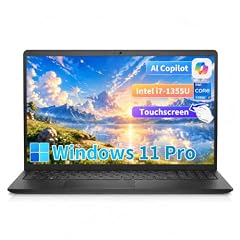
Dell 15 Laptop DC15250 Touchscreen
- CPU
- Intel Core i7-1355U
- RAM
- 16 GB
- Storage
- 512 GB
- Screen
- 15.6 in
- Touchscreen
- Yes
- Weight
- 1.94 kg
- OS
- Windows 11 Pro
$859.99 price as of 2026-10-09 18:21 UTC (Details)
The Dell 15 Touchscreen adds an Intel Core i7-1355U processor, 16GB of memory and 512GB of storage in a 15.6-inch body. It weighs 1.94kg, making it one of the heavier picks here. The listing states Windows 11 Pro, which is a useful detail for developers who want a business-style operating system.
Pros
- 15.6-inch touchscreen display
- Windows 11 Pro as stated in the listing
- 16GB of memory
Cons
- 512GB of storage, the lower tier in this list
- 1.94kg is among the heavier picks
Good fit if
- Developers who want a touchscreen Windows laptop with a Pro OS
- Anyone who prefers a 15.6-inch screen over a 13-inch model
Skip if
- Those who need more than 512GB of local storage
- Developers who want a lighter laptop for daily carrying
Verdict: A touchscreen Windows pick that trades portability for a 15.6-inch display.
7

HP OmniBook 3 16 inch Next Gen AI PC
- CPU
- AMD Ryzen AI 5 430
- GPU
- Radeon 840M
- RAM
- 16 GB
- Storage
- 512 GB
- Screen
- 16 in
- Touchscreen
- Yes
- Weight
- 1.64 kg
- OS
- Windows 11 Home
$903.76 price as of 2026-10-09 18:22 UTC (Details)
The HP OmniBook 3 combines a 16GB AMD Ryzen AI 5 430 processor with a 16-inch touchscreen and 512GB of storage. At 1.64kg, it is lighter than many 16-inch Windows laptops in this list. The listing also states an AMD Radeon 840M GPU, though it does not state the amount of graphics memory.
Pros
- 16-inch touchscreen display
- 1.64kg is light for a 16-inch laptop
- 16GB of memory
Cons
- 512GB of storage
- Graphics memory amount is not stated by the seller
Good fit if
- Developers who want a large touchscreen and a relatively light body
- Windows users who plan to rely on the CPU for most work
Skip if
- Those who need a discrete GPU for local machine learning
- Anyone who wants more than 512GB of storage
Verdict: A 16-inch Windows touchscreen pick with 16GB of memory and a lighter body than most large-screen rivals.
8

HP Victus 15.6" Full HD 144Hz Gaming Laptop
- CPU
- Intel Core i5-12450H
- GPU
- GeForce RTX 3050
- GPU memory
- 6 GB
- RAM
- 16 GB
- Storage
- 512 GB
- Screen
- 15.6 in
- Refresh
- 144 Hz
- OS
- Windows 11 Pro
$875.99 price as of 2026-10-09 18:22 UTC (Details)
The HP Victus brings a discrete GPU into the 16GB group: its listing states a GeForce RTX 3050 with 6GB of graphics memory. The 15.6-inch display has a 144Hz refresh rate, and the 512GB SSD is typical for this tier. This is a good fit for a programmer who also works with 3D or game engines.
Pros
- Discrete GeForce RTX 3050 GPU with 6GB of graphics memory
- 144Hz refresh rate on the display
- 16GB of memory
Cons
- 512GB of storage
- 6GB of graphics memory is less than the 8GB on two other picks here
Good fit if
- Developers who want a discrete GPU for 3D or game work
- Those who prefer a 15.6-inch gaming-style laptop
Skip if
- Programmers who want maximum graphics memory
- Anyone who needs more than 512GB of storage
Verdict: A 16GB Windows pick with a discrete GPU and a high refresh display.
9 Lightest 15.6-inch pick with a stated weight here

HP 255 G10 15.6" FHD Business Laptop
- CPU
- AMD Ryzen 7 7730U
- RAM
- 16 GB
- Storage
- 512 GB
- Screen
- 15.6 in
- Weight
- 1.5 kg
- OS
- Windows 11 Pro
$638.00 price as of 2026-10-09 18:22 UTC (Details) Typical price: $693.99, 8% off
The HP 255 G10 is a 15.6-inch Windows laptop with an AMD Ryzen 7 7730U, 16GB of memory and 512GB of storage. At 1.5kg, it is the lightest 15.6-inch pick with a stated weight in this list. It does not state a discrete GPU, so it is aimed at CPU-based programming work rather than graphics-heavy tasks.
Pros
- Lightest 15.6-inch pick with a stated weight here at 1.5kg
- 16GB of memory and 512GB of storage
- Windows 11 Pro as stated in the listing
Cons
- No discrete GPU is stated
- 512GB of storage
Good fit if
- Developers who want a light 15.6-inch Windows laptop for CPU-based work
- Students who need to carry a laptop to class
Skip if
- Those who need a discrete GPU
- Developers who want more than 512GB of storage
Verdict: A light 15.6-inch Windows pick with 16GB of memory and a business-oriented operating system.
10

Lenovo IdeaPad Pro 5-2025
- CPU
- AMD Ryzen AI 7 350
- GPU
- GeForce RTX 5050
- RAM
- 16 GB
- Storage
- 1000 GB
- Screen
- 16 in
- Refresh
- 120 Hz
- Weight
- 1.78 kg
- OS
- Windows 11 Home
$1,099.00 price as of 2026-10-09 18:22 UTC (Details)
The Lenovo IdeaPad Pro 5 pairs an AMD Ryzen AI 7 350 processor with a GeForce RTX 5050 GPU, 16GB of memory and 1TB of storage. The 16-inch display has a 120Hz refresh rate, and the weight is 1.78kg. It is one of the few picks in this guide that combines a discrete GPU with 1TB of storage.
Pros
- Discrete GeForce RTX 5050 GPU
- 1TB of storage
- 120Hz refresh rate on a 16-inch display
- 16GB of memory
Cons
- 1.78kg is heavier than the 13-inch ultraportables
- GPU graphics memory is not stated by the seller
Good fit if
- Developers who want a discrete GPU and a large local storage
- Those who use machine learning or game engines alongside 16GB of RAM
Skip if
- People who want the lightest possible laptop
- Anyone who needs the exact graphics memory figure in the listing
Verdict: A 16-inch Windows laptop with 16GB, a discrete GPU and 1TB of storage.
11
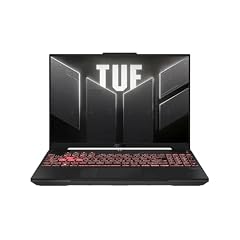
ASUS TUF Gaming A16 Laptop
- CPU
- AMD Ryzen 7 7445HS
- GPU
- GeForce RTX 4050
- RAM
- 16 GB
- Storage
- 512 GB
- Screen
- 16 in
- Refresh
- 145 Hz
- OS
- Windows 11
$1,162.40 price as of 2026-10-09 18:21 UTC (Details)
The ASUS TUF Gaming A16 has a 16-inch Full HD+ display with a 145Hz refresh rate, an AMD Ryzen 7 7445HS processor and a GeForce RTX 4050 GPU, all with 16GB of memory. It does not state a weight in the listing. This is a Windows pick for someone who wants a gaming-style laptop with a discrete GPU for code and game-engine work.
Pros
- Discrete GeForce RTX 4050 GPU
- 16-inch display with a 145Hz refresh rate
- 16GB of memory
Cons
- Weight is not stated by the seller
- 512GB of storage
Good fit if
- Developers who want a discrete GPU and a large high-refresh display
- Programmers who also work in game engines
Skip if
- Those who need a known weight for carrying
- Anyone who wants more than 512GB of storage
Verdict: A 16-inch Windows pick with a discrete GPU and a high refresh display.
12 Most graphics memory here (tied)

acer Nitro V 15.6” FHD IPS 165Hz Gaming Laptop
- CPU
- Intel Core i5-13420H
- GPU
- GeForce RTX 5050
- GPU memory
- 8 GB
- RAM
- 16 GB
- Storage
- 512 GB
- Screen
- 15.6 in
- Refresh
- 165 Hz
- Weight
- 2.11 kg
$1,049.99 price as of 2026-10-09 18:20 UTC (Details)
The Acer Nitro V 15.6 is one of two picks here whose listing states 8GB of graphics memory, tied for the most in this guide. It pairs a GeForce RTX 5050 with 16GB of memory, a 512GB SSD and a 165Hz display. For a developer who wants to explore local machine learning or 3D work, the stated graphics memory is a useful signal.
Pros
- 8GB of graphics memory, tied for the most in this list
- Discrete GeForce RTX 5050 GPU
- 165Hz refresh rate
- 16GB of memory
Cons
- 512GB of storage
- 2.11kg is heavier than ultraportable picks
Good fit if
- Developers who want maximum graphics memory in a 16GB laptop
- Those who work with 3D, game engines or local models
Skip if
- Anyone who needs more than 512GB of storage
- People who want a light laptop for daily carrying
Verdict: A 16GB Windows gaming laptop with 8GB of graphics memory and a high refresh screen.
13 Largest storage here

msi Crosshair 18 HX AI Gaming Laptop 18" QHD+ 240Hz 100% DCI-P3 Intel
- CPU
- Intel Core Ultra 9 275HX
- GPU
- GeForce RTX 5070
- GPU memory
- 8 GB
- RAM
- 16 GB
- Storage
- 2000 GB
- Screen
- 18 in
- Refresh
- 240 Hz
- Weight
- 3.1 kg
$2,139.00 price as of 2026-10-09 18:23 UTC (Details)
The MSI Crosshair 18 HX is the largest storage pick in this guide at 2TB, with 16GB of memory, a GeForce RTX 5070 GPU and 8GB of graphics memory. Its 18-inch display has a 240Hz refresh rate. This is a heavy 3.1kg machine, so it is best for a serious desktop-replacement setup rather than frequent carrying.
Pros
- 2TB of storage, the most in this list
- GeForce RTX 5070 GPU with 8GB of graphics memory
- 18-inch display with a 240Hz refresh rate
- 16GB of memory
Cons
- 3.1kg weight makes it the heaviest pick here
- 16GB of memory on a large desktop-replacement laptop may feel limiting for heavy multitasking
Good fit if
- Developers who need enormous local storage for repositories, containers and datasets
- Those who want a desktop-replacement laptop with a discrete GPU and high refresh display
Skip if
- Anyone who carries the laptop to class or the office daily
- Programmers who want a lighter 16GB machine
Verdict: The largest storage and most graphics memory in this guide, at the cost of weight.
14

Samsung Galaxy Book4 2024 Business Laptop 15.6" FHD IPS 10-Core Intel 7
- CPU
- Intel Core 7 150U
- RAM
- 16 GB
- Storage
- 512 GB
- Screen
- 15.6 in
- Refresh
- 60 Hz
- Weight
- 1.57 kg
- Battery
- 54.4 Wh
- OS
- Windows 11 Home
$766.00 price as of 2026-10-09 18:23 UTC (Details)
The Samsung Galaxy Book4 2024 is a 15.6-inch Windows laptop with an Intel Core 7 150U, 16GB of memory and 512GB of storage. It weighs 1.57kg, placing it among the lighter 15.6-inch picks. The listing states a 60Hz refresh rate and no discrete GPU, so it is a straightforward pick for CPU-based programming.
Pros
- 1.57kg is light for a 15.6-inch laptop
- 16GB of memory
- Windows 11 Home as stated in the listing
Cons
- 512GB of storage
- No discrete GPU is stated
Good fit if
- Developers who want a light Windows laptop for CPU-bound work
- Students who want a 15.6-inch screen without a heavy body
Skip if
- Those who need a discrete GPU
- Anyone who needs more than 512GB of storage
Verdict: A light 15.6-inch Windows pick with 16GB of memory for everyday programming.
Side by side
| # | Laptop | CPU | GPU | GPU memory | Rentable GPU model | RAM | Storage |
|---|---|---|---|---|---|---|---|
| 1 | Apple 2026 MacBook Air 13-inch Laptop with M5 chip | Apple M5 | not stated | not stated | not stated | 16 GB | 1000 GB |
| 2 | Apple 2025 MacBook Pro Laptop | Apple M5 | not stated | not stated | not stated | 16 GB | 1000 GB |
| 3 | Apple 2026 MacBook Air 15-inch Laptop with M5 chip | Apple M5 | not stated | not stated | not stated | 16 GB | 1000 GB |
| 4 | Microsoft Surface Laptop | Qualcomm Snapdragon X2 Elite | not stated | not stated | not stated | 16 GB | 1000 GB |
| 5 | Dell 16 Laptop DC16251-16.0-inch 16 | Intel Core 7 150U | not stated | not stated | not stated | 16 GB | 1000 GB |
| 6 | Dell 15 Laptop DC15250 Touchscreen | Intel Core i7-1355U | not stated | not stated | not stated | 16 GB | 512 GB |
| 7 | HP OmniBook 3 16 inch Next Gen AI PC | AMD Ryzen AI 5 430 | Radeon 840M | not stated | not stated | 16 GB | 512 GB |
| 8 | HP Victus 15.6" Full HD 144Hz Gaming Laptop | Intel Core i5-12450H | GeForce RTX 3050 | 6 GB | not stated | 16 GB | 512 GB |
| 9 | HP 255 G10 15.6" FHD Business Laptop | AMD Ryzen 7 7730U | not stated | not stated | not stated | 16 GB | 512 GB |
| 10 | Lenovo IdeaPad Pro 5-2025 | AMD Ryzen AI 7 350 | GeForce RTX 5050 | not stated | not stated | 16 GB | 1000 GB |
| 11 | ASUS TUF Gaming A16 Laptop | AMD Ryzen 7 7445HS | GeForce RTX 4050 | not stated | not stated | 16 GB | 512 GB |
| 12 | acer Nitro V 15.6” FHD IPS 165Hz Gaming Laptop | Intel Core i5-13420H | GeForce RTX 5050 | 8 GB | not stated | 16 GB | 512 GB |
| 13 | msi Crosshair 18 HX AI Gaming Laptop 18" QHD+ 240Hz 100% DCI-P3 Intel | Intel Core Ultra 9 275HX | GeForce RTX 5070 | 8 GB | not stated | 16 GB | 2000 GB |
| 14 | Samsung Galaxy Book4 2024 Business Laptop 15.6" FHD IPS 10-Core Intel 7 | Intel Core 7 150U | not stated | not stated | not stated | 16 GB | 512 GB |
How we picked
To build this guide, the pool was filtered from a catalogue of 60 distinct laptops that state exactly 16GB of RAM. The group rule for this guide is that every listing must state exactly 16GB of RAM. From that pool, 14 laptops were chosen to cover different programming situations: macOS and Windows, ultraportables and larger machines, and laptops with and without discrete GPUs. Nobody on this site has used or lived with any of these laptops. The specifications in each listing are what the seller states, and where a specification is missing we say it is not stated rather than guess. Prices on this page are live and are read from the store listing at the time the page is shown. Manufacturer pages are cited only for background on chips, operating-system requirements and developer tools, not for real-world results.
How to choose
What 16GB buys a programmer
A 16GB laptop lets you keep an editor, a browser with many tabs, a local database and one or two containers open at the same time. For a large portion of programming work, that is enough headroom. More RAM leaves more room for those tasks to run side by side.
If your daily work involves several virtual machines or very large local model experiments, 16GB can feel tight. In that case, a laptop with 32GB or more is worth looking at. This guide is specifically about the 16GB tier, so every pick here has exactly that amount.
When the GPU matters for code and when it does not
Most web and backend code is CPU-bound, and a laptop without a discrete GPU can handle an editor, browser and local services. A discrete GPU becomes relevant when you work with 3D graphics, game engines or machine learning. The amount of graphics memory on the GPU limits how large a model or scene the card can hold.
In this list, the gaming laptops from Acer, ASUS, HP, Lenovo and MSI state discrete GPUs. The Acer Nitro V and MSI Crosshair both state 8GB of graphics memory, the most in this guide. If you do not need those workloads, a laptop without a discrete GPU is a lighter and simpler choice.
Storage for repositories, containers and virtual machines
Local repositories, dependency caches, container images and virtual machine disks all take space. A 512GB drive is enough for many projects, while 1TB or 2TB gives you more room to keep multiple environments and datasets on the machine. In this list, seven picks state 1TB or more of storage, and the MSI Crosshair states 2TB.
When you are choosing between two 16GB laptops, consider how many large projects and container images you keep at once. Storage is one of the few specifications you cannot easily change in every laptop.
Screen size and weight when you carry it
Screen size changes how much code you see next to a browser or documentation. A 13-inch laptop is easier to fit in a backpack, while a 15-, 16- or 18-inch display gives you more room for side-by-side windows. Weight matters when you carry the machine between campus, the office and home.
The lightest pick with a stated weight here is the Apple MacBook Air 13 at 1.23kg. The heaviest is the MSI Crosshair 18 HX at 3.1kg, which is best left on a desk.
Operating system and your toolchain
The operating system listed for each laptop is part of the decision. Apple's developer tools, including Xcode, require macOS, so the Mac laptops in this list are the ones to consider for Apple-platform development. The Windows picks cover the rest of the field, and their listings state either Windows 11 Home or Windows 11 Pro.
This guide does not rank operating systems or claim which tools run best. It only reflects what each listing states and what the vendor documents.
What this guide leaves out (and why)
This guide is based on the specifications stated in each listing: processor, RAM, storage, screen, weight, GPU and operating system. It does not cover keyboard feel, trackpads, fans, heat, build quality, battery life in hours, Linux compatibility or real-world performance measurements, because this site does not test laptops and the catalogue does not provide that data.
Those qualities matter, but guessing at them would not be honest. Use the stated specs to narrow the field, then check the seller's listing for the remaining details before you buy.
Questions
Is 16GB of RAM enough for programming?
For many programming tasks, 16GB gives an editor, a browser and a local database room to run at the same time. This guide does not measure how much memory any tool uses, so the right answer for your stack depends on what you run. If you keep several virtual machines or very large local models open, 16GB may feel tight and a laptop with 32GB or more could be worth looking at.
Do all the picks in this guide have exactly 16GB?
Yes. The pool for this guide was built from laptop listings that state exactly 16GB of RAM. It holds 60 distinct listings, and from those we selected 14 to cover different situations: macOS and Windows, ultraportables and larger machines, and laptops with and without discrete GPUs. No pick with more or less memory is included.
What does this guide cover and what does it not cover?
This guide is based on the specifications stated in each listing, such as processor, RAM, storage, screen, weight, GPU and operating system. It does not cover keyboard feel, trackpads, fans, heat, build quality, battery life in hours, Linux compatibility or real-world performance measurements, because this site does not test laptops and the catalogue does not provide that data.
Does this guide cover keyboards or Linux?
No. The catalogue has no data on keyboard feel, trackpads, fan noise, or how these laptops behave with other operating systems. This site does not guess at those qualities. If those details matter, start with the stated specifications and check the seller's listing before you buy.
Recent updates
- : First published.