
Best Programming Laptops Under $3000 in 2026: 6 Picks
The Lenovo ThinkPad P16v Gen 2 is the top pick in this guide because it balances the two things programming work asks for most here: 64GB of RAM for editors, browsers, containers and virtual machines, and an RTX 2000 Ada GPU with 8GB of graphics memory for local model and graphics work. The rest of the list covers the other 5 models that fit the catalog filter, chosen only from stated specifications and live listing prices.
6 picks from 8 laptops that match this guide with a price we can quote today. Every price below is live and carries the moment it was read.
The picks at a glance
| # | Pick | Laptop | Price |
|---|---|---|---|
| 1 | Best under $3000 overall | Lenovo ThinkPad P16v Gen 2 Mobile Workstation Laptop | $2,999.99 price as of 2026-10-09 17:22 UTC (Details) |
| 2 | Best under $3000 for machine learning | msi Vector 16 HX AI Gaming Laptop 16" QHD+ IPS 240Hz Intel 24-core Ultra | $2,969.08 price as of 2026-10-09 17:22 UTC (Details) |
| 3 | Best under $3000 for a 16-inch screen in a lighter frame | Lenovo ThinkPad P1 Gen 7 | $2,999.70 price as of 2026-10-09 17:22 UTC (Details) |
| 4 | Best under $3000 for RAM-heavy development | HP ZBook 8 G1i 16" WUXGA AI Mobile Workstation | $2,997.99 price as of 2026-10-09 17:22 UTC (Details) |
| 5 | Best under $3000 for a 14-inch screen | Lenovo 2026 ThinkPad P14s Gen 7 w/Ryzen AI 9 HX PRO | $2,999.99 price as of 2026-10-09 17:22 UTC (Details) |
| 6 | Lightest here | Lenovo ThinkPad P15 Mobile Workstation | $2,999.00 price as of 2026-10-09 17:22 UTC (Details) |
Which one should you buy?
- For a developer running containers and virtual machines next to an editor: This machine's 64GB of RAM leaves room for a local database, several containers and a browser with many tabs at the same time. The 1TB drive holds current repositories and images. See pick 1
- For a machine learning engineer experimenting with local models: 16GB of graphics memory is the most in this list, which determines how large a model the card can hold. 2TB of storage leaves space for datasets and model files. See pick 2
- For a consultant who moves between offices and client sites: At 1.81kg, this is the lightest stated weight in the list, and it still carries 64GB of RAM and 2TB of storage for repositories and build outputs. See pick 6
- For a student working from a small desk or a library: The 14-inch screen is the smallest here, and the 64GB RAM is tied for the most in this list. The touchscreen is stated by the seller. See pick 5
The 6 picks
1 Best under $3000 overall

Lenovo ThinkPad P16v Gen 2 Mobile Workstation Laptop
- CPU
- Intel Core Ultra 7 165H
- GPU
- RTX 2000 Ada
- GPU memory
- 8 GB
- RAM
- 64 GB
- Storage
- 1000 GB
- Screen
- 16 in
- Refresh
- 60 Hz
- Battery
- 90 Wh
$2,999.99 price as of 2026-10-09 17:22 UTC (Details)
This is the most balanced pick in the group: 64GB of RAM is tied for the most here, and the RTX 2000 Ada GPU with 8GB of graphics memory covers local model work and 3D engines. The 16-inch screen gives room for code beside a browser, and the listing states a 90Wh battery. It is the machine to start with for general programming under $3000.
Pros
- 64GB of RAM, tied for the most in this list
- RTX 2000 Ada GPU with 8GB of graphics memory
- 16-inch display and Windows 11 Pro
- Listing states a 90Wh battery
Cons
- 1TB of storage, less than the 2TB models here
- Weight is not stated by the seller
- 60Hz display, not a high-refresh panel
Good fit if
- Developers running containers, virtual machines and local GPU work
- Anyone who wants one machine for both coding and machine learning experimentation
Skip if
- You need more than 1TB of internal storage
- You want the largest graphics memory available in this budget
Verdict: A balanced 64GB workstation that covers the daily development stack and leaves room for GPU work.
2 Best under $3000 for machine learning
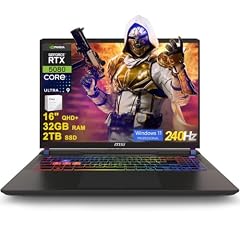
msi Vector 16 HX AI Gaming Laptop 16" QHD+ IPS 240Hz Intel 24-core Ultra
- CPU
- Intel Core Ultra 9 275HX
- GPU
- GeForce RTX 5080
- GPU memory
- 16 GB
- RAM
- 32 GB
- Storage
- 2000 GB
- Screen
- 16 in
- Refresh
- 240 Hz
- OS
- Windows 11 Pro
$2,969.08 price as of 2026-10-09 17:22 UTC (Details)
The GeForce RTX 5080 in this laptop is listed with 16GB of graphics memory, the most in this list. That memory is what limits how large a model or scene the GPU can hold, so it is the pick to consider first for local machine learning. The 2TB storage and 32GB RAM support large datasets and a serious development environment. Intel's naming guide identifies the HX suffix as the highest-performance mobile class in the Core Ultra family, which is why this listing stands out on CPU.
Pros
- 16GB of graphics memory, the most in this list
- 2TB of storage
- Windows 11 Pro
- Intel Core Ultra 9 275HX, an HX-class mobile CPU
Cons
- 32GB of RAM, less than the four 64GB laptops here
- Weight is not stated by the seller
- 240Hz display is listed, but refresh rate does not affect code editing
Good fit if
- Machine learning engineers and researchers experimenting with local models
- Developers who want the most graphics memory in this budget
Skip if
- You need more than 32GB of RAM
- You prefer a lighter workstation without a gaming-oriented screen
Verdict: The strongest GPU option in the list, with the most graphics memory and plenty of storage.
3 Best under $3000 for a 16-inch screen in a lighter frame

Lenovo ThinkPad P1 Gen 7
- CPU
- Intel Core Ultra 7
- GPU
- RTX 3000 Ada
- GPU memory
- 8 GB
- RAM
- 32 GB
- Screen
- 16 in
- Weight
- 1.86 kg
$2,999.70 price as of 2026-10-09 17:22 UTC (Details)
At 1.86kg, this is lighter than the HP ZBook at 2.09kg and still has a 16-inch display. It pairs 32GB of RAM with an RTX 3000 Ada GPU and 8GB of graphics memory. This is a good middle ground for developers who want a workstation-class GPU without the heaviest chassis.
Pros
- Stated weight of 1.86kg, lighter than the HP ZBook
- RTX 3000 Ada GPU with 8GB of graphics memory
- 32GB of RAM
- 16-inch display
Cons
- Storage is not stated by the seller
- 32GB of RAM, less than the 64GB models here
- Only 8GB of graphics memory, less than the MSI's 16GB
Good fit if
- Developers who carry a workstation between campus, office and home
- Those who need a capable GPU without the heaviest chassis
Skip if
- You need a listing that states internal storage
- You want the highest RAM or graphics memory in this budget
Verdict: A lighter 16-inch workstation with a strong GPU for developers who move around.
4 Best under $3000 for RAM-heavy development
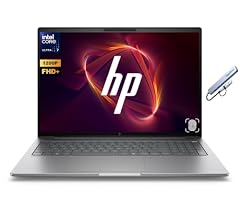
HP ZBook 8 G1i 16" WUXGA AI Mobile Workstation
- CPU
- Intel Core Ultra 7 255H
- RAM
- 64 GB
- Storage
- 2000 GB
- Screen
- 16 in
- Weight
- 2.09 kg
- OS
- Windows 11 Pro
$2,997.99 price as of 2026-10-09 17:22 UTC (Details)
This HP workstation lists 64GB of RAM and 2TB of storage, the same top-tier memory as three other picks and the same top-tier storage as two others. The Core Ultra 7 255H and RTX 500 Ada are stated in the listing. If your daily work is many containers, virtual machines and large repositories, this gives you both memory and disk room.
Pros
- 64GB of RAM, tied for the most in this list
- 2TB of storage, tied for the largest here
- Windows 11 Pro
- 16-inch display
Cons
- Graphics memory is not stated by the seller
- Stated weight of 2.09kg, heavier than the P1 and P15
- RTX 500 Ada GPU as listed, with no VRAM figure in the listing
Good fit if
- Developers running memory-heavy local services
- Teams that standardize on Windows workstations
Skip if
- You need the seller to state graphics memory
- You want the lightest laptop in this group
Verdict: A high-memory, high-storage Windows workstation for container and VM work.
5 Best under $3000 for a 14-inch screen

Lenovo 2026 ThinkPad P14s Gen 7 w/Ryzen AI 9 HX PRO
- RAM
- 64 GB
- Screen
- 14 in
- Touchscreen
- Yes
$2,999.99 price as of 2026-10-09 17:22 UTC (Details)
This is the only 14-inch laptop in the pool, and it still lists 64GB of RAM, tied for the most here. The Ryzen AI 9 HX PRO CPU and touchscreen are stated by the seller. If a smaller machine matters more than a discrete GPU, this is the pick to compare against the 16-inch workstations.
Pros
- 64GB of RAM, tied for the most in this list
- 14-inch screen, the smallest here
- Touchscreen is stated by the seller
- Ryzen AI 9 HX PRO processor as listed
Cons
- Storage is not stated by the seller
- GPU is not stated by the seller
- Weight is not stated by the seller
Good fit if
- Students or consultants who want a compact machine for class and library work
- Developers who value memory and screen size over discrete graphics
Skip if
- You need a discrete GPU for machine learning or 3D work
- You need the seller to state internal storage before ordering
Verdict: A memory-heavy 14-inch option for programmers who want to travel light.
6 Lightest here

Lenovo ThinkPad P15 Mobile Workstation
- CPU
- Intel Core i7-11850H
- GPU
- RTX A2000
- GPU memory
- 4 GB
- RAM
- 64 GB
- Storage
- 2000 GB
- Screen
- 15.6 in
- Weight
- 1.81 kg
- OS
- Windows 11 Pro
$2,999.00 price as of 2026-10-09 17:22 UTC (Details)
With a stated weight of 1.81kg, this ThinkPad P15 is the lightest laptop in the list. It also carries 64GB of RAM and 2TB of storage, which makes it an unusual combination of portability and capacity. The Intel Core i7-11850H and RTX A2000 with 4GB of graphics memory are reflected in the listing, but the memory and storage still compete with the newer models.
Pros
- Stated weight of 1.81kg, the lightest here
- 64GB of RAM, tied for the most in this list
- 2TB of storage, tied for the largest here
Cons
- 4GB of graphics memory, the least stated in this list
- Intel Core i7-11850H is an earlier-generation CPU name
- 15.6-inch screen, between the 14-inch and 16-inch models
Good fit if
- Developers who need maximum RAM and storage in a portable workstation
- Those who prefer a traditional 15.6-inch screen
Skip if
- You need more than 4GB of VRAM for machine learning
- You want a current-generation Intel CPU name
Verdict: The lightest way to get 64GB of RAM and 2TB of storage in this group.
Side by side
| # | Laptop | CPU | GPU | GPU memory | Rentable GPU model | RAM | Storage |
|---|---|---|---|---|---|---|---|
| 1 | Lenovo ThinkPad P16v Gen 2 Mobile Workstation Laptop | Intel Core Ultra 7 165H | RTX 2000 Ada | 8 GB | not stated | 64 GB | 1000 GB |
| 2 | msi Vector 16 HX AI Gaming Laptop 16" QHD+ IPS 240Hz Intel 24-core Ultra | Intel Core Ultra 9 275HX | GeForce RTX 5080 | 16 GB | not stated | 32 GB | 2000 GB |
| 3 | Lenovo ThinkPad P1 Gen 7 | Intel Core Ultra 7 | RTX 3000 Ada | 8 GB | not stated | 32 GB | not stated |
| 4 | HP ZBook 8 G1i 16" WUXGA AI Mobile Workstation | Intel Core Ultra 7 255H | not stated | not stated | not stated | 64 GB | 2000 GB |
| 5 | Lenovo 2026 ThinkPad P14s Gen 7 w/Ryzen AI 9 HX PRO | not stated | not stated | not stated | not stated | 64 GB | not stated |
| 6 | Lenovo ThinkPad P15 Mobile Workstation | Intel Core i7-11850H | RTX A2000 | 4 GB | not stated | 64 GB | 2000 GB |
How we picked
To build this guide, the catalog was filtered to listings in the target price range that state at least 16GB of RAM. The pool held 8 priced listings; after near-duplicate models were folded, 6 laptops remained and all 6 are covered here. Specs come from the seller listings and are exactly what this site has: RAM, CPU, GPU and graphics memory, storage, screen size, weight and operating system where stated. No one at this site has tested, benchmarked, or handled any of these machines. Prices shown on the page are live from the listing and change over time, so this guide does not quote prices or rank by them.
How to choose
What 64GB of RAM does for a busy development setup
Four of the six laptops here state 64GB of RAM, which is the most in this group. More memory leaves room for an editor, a browser with many tabs, a local database, and containers or virtual machines running at the same time. Visual Studio Code's own published requirements are modest, so the extra RAM is for the work around the editor, not the editor itself. If your work is mostly a single editor and a terminal, 32GB is also represented in this list, in the MSI and the Lenovo ThinkPad P1.
When the GPU matters for code and when it does not
For many programming tasks, the GPU is not the part of the laptop that speeds up the edit-build-test loop. It becomes relevant when you train or run machine learning models, work in 3D or game engines, or use GPU-accelerated rendering. The amount of graphics memory determines how large a model or scene the card can hold. In this list, the MSI Vector states 16GB of VRAM, the Lenovo ThinkPad P1 and P16v state 8GB, and the ThinkPad P15 states 4GB. The HP ZBook's graphics memory is not stated by the seller.
Storage for repositories, container images and virtual machines
Three of the six laptops state 2TB of storage, one states 1TB, and two do not state storage at all. A 2TB drive gives room for several project repositories, dependencies, container images, virtual machine disks and datasets. A 1TB drive can still hold a working set, but you may need to prune images or move older projects to external storage. If a listing does not state storage, check the product page for the exact configuration before ordering.
Screen size and weight when you carry it
The group is mostly 16-inch laptops, with one 15.6-inch model and one 14-inch model. The stated weights run from 1.81kg on the ThinkPad P15 to 2.09kg on the HP ZBook; three models do not state weight. If you carry the laptop to a campus or an office, a lighter unit and a smaller screen usually mean less weight in the bag, but you trade screen room for code beside a browser.
What this guide leaves out (and why)
This guide can only work with the information the listing states. It does not cover keyboard feel, trackpad quality, fan noise, battery life in hours or build quality, because the catalog has no data for those and this site does not guess. It also does not assess Linux compatibility or driver support. If those matter to you, treat the stated specs here as a starting point and confirm the rest from the maker's documentation.
Questions
Does this guide cover keyboards or Linux?
No. The catalog provides RAM, CPU, GPU, storage, screen size, weight and operating system where the seller states them. It does not include keyboard feel, trackpad comfort, fan noise, battery life in hours, or Linux driver support, and this site does not guess at those. Use the stated specs to narrow the field, then check the maker's own documentation for details this guide cannot verify.
How much RAM do I need for containers and virtual machines?
The listings do not say how much memory Docker or a hypervisor uses, and this guide will not invent figures. The practical advice is simple: more RAM leaves more room for an editor, browser, local database, containers and virtual machines to run at the same time. In this list, four of six laptops state 64GB, and two state 32GB.
Is the GPU necessary for programming?
Not for every kind of programming. Editing code, running a local server and compiling most projects do not depend on a discrete GPU. The GPU matters when you run machine learning workloads, build 3D scenes or work in game engines, because graphics memory limits how large a model or scene the card can hold. Choose a GPU based on the kind of work you actually do.
Why do you not quote prices?
The price on each listing changes over time and is read live when the page loads. Any dollar amount written into this guide would be stale soon after publication. Instead, each pick includes a buy button with the current listing price and the time it was read, so you can compare the machines without relying on a number that has already changed.
Do all the picks run the tools I use?
No tool compatibility is guaranteed here. The site only reports what the seller states about the machine, such as the operating system and hardware. Software requirements change and vary by version, so check the documentation for the editor, container runtime, virtual machine software or framework you use. Vendor system requirement pages are a better source than this guide for that question.
Recent updates
- : First published.