
Best Programming Laptops Under $2000 in 2026: 6 Picks
The Lenovo Legion 5a is the default choice for this price window: it pairs 32GB of RAM with a stated GeForce RTX 5060 with 8GB of graphics memory and 1000GB of storage, so it can handle everyday coding plus local GPU work without asking you to choose sides. This guide covers the six unique listings that fit the rule for this page, all of them stated with 16GB or more RAM. The picks below are based only on the specifications in each listing; nobody on this site has used them.
6 picks from 6 laptops that match this guide with a price we can quote today. Every price below is live and carries the moment it was read.
The picks at a glance
| # | Pick | Laptop | Price |
|---|---|---|---|
| 1 | Best touchscreen Windows 11 Pro pick | Dell 15 Touchscreen Laptop | $1,999.99 price as of 2026-10-09 17:21 UTC (Details) |
| 2 | Best all-around pick | Lenovo Legion 5a Gaming Laptop | $1,999.99 price as of 2026-10-09 17:22 UTC (Details) |
| 3 | Best large-screen RTX 5060 pick | HP HyperX OMEN 16" 165Hz WUXGA Gaming Laptop | $1,999.00 price as of 2026-10-09 17:21 UTC (Details) |
| 4 | Best 4K display here | Lenovo ThinkPad P16s Gen 4 | $2,089.99 price as of 2026-10-09 17:22 UTC (Details) |
| 5 | Most storage here | HP ProBook 4 G1i AI Business Laptop 16.0" 60Hz IPS WUXGA | $1,967.99 price as of 2026-10-09 17:22 UTC (Details) |
| 6 | Most RAM here | HP ProBook 4 G1i AI Business Laptop 16.0" 60Hz IPS 64GB/512GBSSD/W11P | $1,927.99 price as of 2026-10-09 17:22 UTC (Details) |
Which one should you buy?
- For a React developer with a browser, an editor and a container open: 32GB of RAM on the Dell 15 leaves room for the browser, your editor and local services side by side. The touchscreen and Windows 11 Pro are listed specifications, not promises about feel. See pick 1
- For a student whose coursework needs a virtual machine: The HP ProBook with 64GB of RAM is the only pick here with that much memory, which matters when a virtual machine shares the laptop with your coursework and a browser. See pick 6
- For someone running local machine-learning experiments: The Lenovo Legion is the only pick whose listing states both 8GB of graphics memory and 32GB of RAM, so the GPU can hold a larger model than a card with less memory. See pick 2
- For a developer who carries the laptop between campus and a cafe: The HP ProBook with 2000GB of storage pairs the lightest stated weight in this pool with the most storage, so a commuter can keep repositories and virtual machine disks on the machine. See pick 5
The 6 picks
1 Best touchscreen Windows 11 Pro pick

Dell 15 Touchscreen Laptop
- CPU
- Intel Core i5
- RAM
- 32 GB
- Storage
- 1000 GB
- Screen
- 15.6 in
- Touchscreen
- Yes
- Weight
- 1.94 kg
- OS
- Windows 11 Pro
$1,999.99 price as of 2026-10-09 17:21 UTC (Details)
This pick pairs 32GB of RAM with 1000GB of storage and a 15.6-inch touchscreen, so it can keep an editor, browser and local services open together. Windows 11 Pro is stated in the listing, which fits developers who need Pro-level business features.
Pros
- 32GB of RAM, equal to most picks here
- 1000GB of storage
- Windows 11 Pro stated in the listing
- 15.6-inch touchscreen stated in the listing
Cons
- Discrete GPU not stated by the seller
- No display resolution or refresh rate stated in the listing
- At 1.94kg, heavier than the 1.72kg ProBooks
Good fit if
- Developers who want a touchscreen Windows 11 Pro machine with 32GB of RAM
- Programmers who plan to keep a browser, editor and local services open at the same time
Skip if
- You need a discrete GPU for local machine-learning work
- You want the largest storage in this group, which is the 2000GB ProBook
Verdict: A balanced Windows 11 Pro workhorse with the memory and storage most programmers will want.
2 Best all-around pick

Lenovo Legion 5a Gaming Laptop
- CPU
- AMD Ryzen 7 250
- GPU
- GeForce RTX 5060
- GPU memory
- 8 GB
- RAM
- 32 GB
- Storage
- 1000 GB
- Screen
- 15.3 in
- Refresh
- 165 Hz
- Weight
- 2.27 kg
$1,999.99 price as of 2026-10-09 17:22 UTC (Details)
This is the pick we lead with in this price window because it is the only laptop here that states both 8GB of graphics memory and 32GB of RAM. That combination covers everyday coding and leaves room for local GPU work, and its 15.3-inch OLED panel is stated at 165Hz.
Pros
- GeForce RTX 5060 with 8GB of stated graphics memory, the most in this pool
- 32GB of RAM
- 1000GB of storage
- 15.3-inch OLED display stated at 165Hz
Cons
- At 2.27kg, heavier than the 1.72kg ProBooks
- Windows 11, not Windows 11 Pro, in the stated specs
- Battery capacity of 80Wh is stated, but battery life in hours is not
Good fit if
- Programmers who want a single machine for coding and local GPU experiments
- Developers who value a stated 165Hz OLED display
Skip if
- You want the highest RAM option, the 64GB ProBook
- You carry the laptop daily and prefer the lightest stated weight
Verdict: The most complete programming configuration in this price window when you need both memory and a discrete GPU.
3 Best large-screen RTX 5060 pick
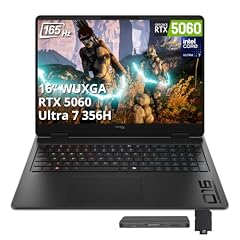
HP HyperX OMEN 16" 165Hz WUXGA Gaming Laptop
- CPU
- Intel Core Ultra 7 356H
- GPU
- GeForce RTX 5060
- RAM
- 16 GB
- Storage
- 1000 GB
- Screen
- 16 in
- Refresh
- 165 Hz
- Weight
- 2.44 kg
- OS
- Windows 11
$1,999.00 price as of 2026-10-09 17:21 UTC (Details)
The HP HyperX OMEN is the largest RTX 5060 laptop here, with a stated 16-inch 165Hz display. It pairs the discrete GPU with 16GB of RAM and 1000GB of storage, which makes it a candidate for developers who want a big screen and a graphics card in one machine.
Pros
- GeForce RTX 5060 stated in the listing
- 16-inch display with a stated 165Hz refresh rate
- 1000GB of storage
- Windows 11 stated in the listing
Cons
- 16GB of RAM, the lowest amount in this pool
- Graphics memory not stated by the seller
- At 2.44kg, the heaviest laptop in this group
Good fit if
- Developers who want a large screen and a discrete GPU in one configuration
- Programmers who do not mind the highest stated weight in exchange for the 16-inch display
Skip if
- You want more than 16GB of RAM for containers and virtual machines
- You prefer a lighter laptop for commuting
Verdict: A 16-inch RTX 5060 laptop that trades memory capacity for the largest screen here.
4 Best 4K display here

Lenovo ThinkPad P16s Gen 4
- CPU
- AMD Ryzen AI 7 PRO 350
- RAM
- 32 GB
- Storage
- 1000 GB
- Touchscreen
- Yes
$2,089.99 price as of 2026-10-09 17:22 UTC (Details)
Outside this guide's budget at today's price.
The ThinkPad P16s is the only pick whose listing states a 4K OLED touchscreen with 100% DCI-P3, which gives you high pixel density and wide color coverage for UI work and visual checks. It also states 32GB of RAM and 1000GB of storage.
Pros
- Stated 4K OLED touchscreen with 100% DCI-P3
- 32GB of RAM
- 1000GB of storage
- AMD Ryzen AI 7 PRO 350 stated in the listing
Cons
- Operating system not stated by the seller
- Screen size and weight not stated by the seller
- Discrete GPU not stated by the seller
Good fit if
- Programmers who spend most of the day looking at a high-resolution display
- Developers who want a touchscreen and a 4K panel without needing a discrete GPU
Skip if
- You need a stated operating system before buying
- You want a known screen size and weight for commuting
Verdict: The display-focused pick for programmers who want 4K OLED pixels and 32GB of RAM.
5 Most storage here
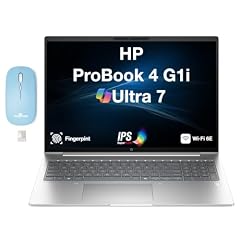
HP ProBook 4 G1i AI Business Laptop 16.0" 60Hz IPS WUXGA
- CPU
- Intel Core Ultra 7
- RAM
- 32 GB
- Storage
- 2000 GB
- Screen
- 16 in
- Refresh
- 60 Hz
- Weight
- 1.72 kg
- Battery
- 56 Wh
- OS
- Windows 11 Pro
$1,967.99 price as of 2026-10-09 17:22 UTC (Details)
This ProBook is the storage pick: its listing states 2000GB, the most in this pool, which gives repositories, container images and virtual machine disks more room. It also states 32GB of RAM and Windows 11 Pro in a 16-inch body at 1.72kg.
Pros
- 2000GB of storage, the most in this pool
- 32GB of RAM
- Windows 11 Pro stated in the listing
- 1.72kg, tied for the lightest weight here
Cons
- 60Hz display, with no high refresh rate stated
- Discrete GPU not stated in the listing
- Battery capacity of 56Wh is stated, lower than the Legion's 80Wh
Good fit if
- Programmers who keep many container images or virtual machine disks on the laptop
- Developers who need Windows 11 Pro and a lighter 16-inch machine
Skip if
- You need the 64GB RAM option, which is the other ProBook
- You plan to do local GPU work on the laptop
Verdict: The storage-first ProBook for developers whose projects fill a 1000GB drive quickly.
6 Most RAM here
HP ProBook 4 G1i AI Business Laptop 16.0" 60Hz IPS 64GB/512GBSSD/W11P
- CPU
- Intel Core Ultra 7
- RAM
- 64 GB
- Storage
- 512 GB
- Screen
- 16 in
- Refresh
- 60 Hz
- Weight
- 1.72 kg
- Battery
- 56 Wh
- OS
- Windows 11 Pro
$1,927.99 price as of 2026-10-09 17:22 UTC (Details)
This ProBook is the memory pick: 64GB of RAM is the most in this pool, which leaves substantial headroom for containers, virtual machines, a browser and an editor running side by side. It keeps Windows 11 Pro and the same 1.72kg, 16-inch body as the 2TB version.
Pros
- 64GB of RAM, the most in this pool
- Windows 11 Pro stated in the listing
- 1.72kg, tied for the lightest weight here
- 16-inch display stated in the listing
Cons
- 512GB of storage, the smallest in this pool
- Discrete GPU not stated in the listing
- 60Hz display, with no high refresh rate stated
Good fit if
- Programmers who run several containers or virtual machines at once
- Developers who want the highest RAM in this price group
Skip if
- You need more than 512GB of local storage
- You want a discrete GPU for machine learning or 3D work
Verdict: The memory-first choice for programmers who keep many heavyweight environments open.
Side by side
| # | Laptop | CPU | GPU | GPU memory | Rentable GPU model | RAM | Storage |
|---|---|---|---|---|---|---|---|
| 1 | Dell 15 Touchscreen Laptop | Intel Core i5 | not stated | not stated | not stated | 32 GB | 1000 GB |
| 2 | Lenovo Legion 5a Gaming Laptop | AMD Ryzen 7 250 | GeForce RTX 5060 | 8 GB | not stated | 32 GB | 1000 GB |
| 3 | HP HyperX OMEN 16" 165Hz WUXGA Gaming Laptop | Intel Core Ultra 7 356H | GeForce RTX 5060 | not stated | not stated | 16 GB | 1000 GB |
| 4 | Lenovo ThinkPad P16s Gen 4 | AMD Ryzen AI 7 PRO 350 | not stated | not stated | not stated | 32 GB | 1000 GB |
| 5 | HP ProBook 4 G1i AI Business Laptop 16.0" 60Hz IPS WUXGA | Intel Core Ultra 7 | not stated | not stated | not stated | 32 GB | 2000 GB |
| 6 | HP ProBook 4 G1i AI Business Laptop 16.0" 60Hz IPS 64GB/512GBSSD/W11P | Intel Core Ultra 7 | not stated | not stated | not stated | 64 GB | 512 GB |
How we picked
This guide starts from a pool of six laptop listings that fit a single rule: they sit inside the price window for this page and state 16GB of RAM or more. We kept all six because the shortlist is smaller than a full roundup. Prices are live and read from the store listing at the time the page is generated, so the figure on the buy button is the current one; we do not repeat prices in the text. No unit has been used by anyone at this site, and the picks are based only on the specifications stated in the seller's listings. Where a listing omits a spec, we say the seller did not state it rather than guessing.
How to choose
What your editor, browser and containers ask of RAM
Most of these picks state 32GB of RAM, and one states 64GB. The 16GB listed on the HP HyperX OMEN is the floor for this guide. More RAM leaves more room for an editor, a browser with many tabs, a local database and containers or virtual machines to run at the same time. The editor itself is the small part; the rest of your environment, browser, database and containers, is what fills memory. If you keep several of those open all day, the 64GB ProBook is the strongest specification here.
When the GPU matters for code and when it does not
A discrete GPU matters when your work touches machine learning, local models, 3D or game engines. The amount of graphics memory limits how large a model or scene the card can hold. In this pool, the Lenovo Legion states 8GB of graphics memory; the HP HyperX OMEN states a GeForce RTX 5060 but no graphics memory figure; the other picks do not state a discrete GPU. For web, backend or systems programming, a GPU is often not a deciding specification, but it adds room if you move into GPU-based work later.
Storage for repositories, images and virtual machines
Repositories, dependencies, container images and virtual machine disks accumulate space quickly. This pool ranges from 512GB on the 64GB ProBook to 2000GB on the storage-focused ProBook, with most picks at 1000GB. Think about what you keep locally. If you plan to store datasets or several VM disks, the 2000GB option removes the need to offload; if you prefer maximum RAM, the 64GB ProBook asks you to live with 512GB.
Screen size and weight when you carry it
The pool includes 15.3-inch, 15.6-inch and 16-inch displays. The two ProBooks list 1.72kg, the lightest weight here, while the HP HyperX OMEN lists 2.44kg, the heaviest. A larger screen gives you more room for code beside a browser, and a lighter laptop is easier to carry between campus, an office and a cafe. Weight figures come only from the listings.
Operating system and developer toolchains
Most picks state Windows 11 or Windows 11 Pro. Windows 11 Pro adds Pro-level management and domain features that some corporate developers need. One listing, the ThinkPad P16s, does not state an operating system. None of these laptops is an Apple laptop, so developers who need Apple's Xcode or related tools would need to look outside this pool.
What this guide leaves out (and why)
The catalogue has no data on keyboard feel, fan noise, build quality, battery life in hours, Linux compatibility or benchmark scores. This site does not guess at those qualities from the specs. The picks here are based on stated specifications: RAM, CPU, GPU and graphics memory, storage, screen size, weight and operating system. For anything else, the honest answer is that the listing does not say.
Questions
Does this guide cover keyboards, Linux support or battery life?
No. The catalogue only states specifications such as RAM, storage, screen size, weight and operating system. It has no data on keyboard feel, fan noise, build quality, Linux driver support or battery life measured in hours. We treat missing information as missing and do not guess. For those qualities you would need to try the machine yourself, which this guide does not do.
Why does RAM matter so much for a programming laptop?
A programmer rarely runs just the editor. The browser, a local database, containers and virtual machines can be open at the same time, and memory is what lets them share the machine without forcing one to close. Most picks here state 32GB, and one states 64GB. More RAM leaves more room for those tasks; 16GB is the stated floor for this list, not a recommendation about what any tool needs.
When should I choose a laptop with a discrete GPU?
If your work involves machine learning, local models, 3D graphics or game engines, a discrete GPU is worth considering. The amount of graphics memory limits how large a model or scene the card can hold. In this pool the Lenovo Legion states 8GB of graphics memory. For web, backend or systems programming, a stated discrete GPU is not necessary for most tasks, though it can be useful if you move into GPU-based work later.
Is 512GB of storage enough for programming?
It can work, but storage fills faster than many programmers expect. Repositories, installed dependencies, container images, virtual machine disks and datasets all occupy space. The 64GB ProBook in this pool pairs the largest RAM with 512GB of storage, while the other ProBook offers 2000GB with 32GB of RAM. If you keep many large images or datasets locally, choose storage first; if RAM matters more, the 64GB configuration has the stated headroom.
Can I do iOS or macOS development with any of these laptops?
None of the picks in this pool is an Apple laptop, and Apple's Xcode and related tools require Apple hardware and macOS. If iOS or macOS development is your main job, you would need to look outside this group. For mobile work in general, these Windows laptops can still be used for cross-platform web or cloud development, but not for building and signing Apple platform apps.
Recent updates
- : First published.