
Best Laptops for Game Development in 2026: 14 Picks by Specs
The Lenovo Legion 5a is the top pick for game development: it pairs 32GB of RAM with a GeForce RTX 5060 that has 8GB of graphics memory, and its 1TB SSD leaves room for engines and project files. The guide chooses from a pool of 113 listings that all state 32GB of RAM or more and a graphics card with 6GB of graphics memory or more. No laptop was physically handled; every pick comes from the specifications listed for each machine.
14 picks from 109 laptops that match this guide with a price we can quote today. Every price below is live and carries the moment it was read.
The picks at a glance
Which one should you buy?
- For a developer building 3D scenes in a game engine: The Lenovo Legion 5a pairs 32GB of RAM with an 8GB RTX 5060 and a 1TB SSD, enough room for an engine, a browser, and a project build at the same time. The 15.3-inch OLED screen with 165Hz refresh is a practical size for viewport-heavy work. See pick 1
- For a programmer doing machine learning experiments as part of game tooling: Machine learning experiments in game tools depend on the graphics memory available on the GPU. This Eluktronics has 24GB of graphics memory, the highest amount in this guide, plus 64GB of system RAM. See pick 11
- For a student taking a game development course: A first game development course will ask you to install an engine, an editor, and a source control client. The HP Victus covers that with 32GB of RAM, a 6GB RTX 4050, and a 1TB SSD. See pick 2
- For a developer who carries the laptop between campus and a team workspace: At 1.86kg, the ThinkPad P1 is the lightest laptop in this guide, so it is easier to move between campus and a team workspace. It still carries 32GB of RAM and an 8GB RTX 3000 Ada for engine and editor work. See pick 9
The 14 picks
1 Best overall pick for game development

Lenovo Legion 5a Gaming Laptop
- CPU
- AMD Ryzen 7 250
- GPU
- GeForce RTX 5060
- GPU memory
- 8 GB
- RAM
- 32 GB
- Storage
- 1000 GB
- Screen
- 15.3 in
- Refresh
- 165 Hz
- Weight
- 2.27 kg
$1,999.99 price as of 2026-10-09 17:22 UTC (Details)
The Legion 5a sits at a useful middle of this guide: 32GB of RAM, an RTX 5060 with 8GB of graphics memory, and a 1TB SSD. Its 15.3-inch OLED panel states a 165Hz refresh rate, and the 2.27kg weight is near the center of the range. That combination makes it a strong default for an engine, an editor, and a browser open at once.
Pros
- 32GB of RAM, enough for an engine and build tools to run side by side
- GeForce RTX 5060 with 8GB of graphics memory
- 1TB SSD for project files
- 15.3-inch OLED screen with a stated 165Hz refresh rate
Cons
- 8GB of graphics memory is lower than the 12GB, 16GB, and 24GB cards in this guide
- 2.27kg is not the lightest option here
Good fit if
- A developer who wants one machine for engine work and local 3D projects
- A programmer who prefers a 15-inch screen and an OLED panel
Skip if
- You need more than 8GB of graphics memory for large scenes or local models
- You want the lightest laptop in this guide
Verdict: A balanced 15-inch pick for game development with 32GB of RAM and an 8GB RTX 5060.
2 Entry pick with a 6GB GPU and 32GB RAM

HP Victus 15.6" Gaming Laptop
- CPU
- AMD Ryzen 7 7445HS
- GPU
- GeForce RTX 4050
- GPU memory
- 6 GB
- RAM
- 32 GB
- Storage
- 1000 GB
- Screen
- 15.6 in
- Refresh
- 144 Hz
- OS
- Windows 11
$1,299.00 price as of 2026-10-09 17:22 UTC (Details)
The HP Victus is the direct entry point to the pool requirements: 32GB of RAM, a GeForce RTX 4050 with 6GB of graphics memory, and a 1TB SSD. Its 15.6-inch 144Hz screen is the smallest panel class in this guide. The seller does not state a weight.
Pros
- 32GB of RAM at the same pool minimum as larger picks
- 6GB of graphics memory, which meets the guide's floor
- 1TB SSD for a starting project library
- Stated 144Hz refresh rate
Cons
- No weight stated by the seller
- 6GB of graphics memory is the smallest amount in this guide
Good fit if
- A student or intern starting game development coursework
- A developer working mostly in 2D or small 3D scenes
Skip if
- You plan to build large 3D scenes or run local models that need more graphics memory
- You need a stated weight for planning a commute
Verdict: An entry-level pick that meets the 32GB RAM and 6GB GPU floor for game development.
3 AMD pick with 8GB of graphics memory

ASUS TUF Gaming A16 Laptop 16" WUXGA 165Hz 100% sRGB AMD 8-core Ryzen 7
- CPU
- AMD Ryzen 7 7735HS
- GPU
- Radeon RX 7700S
- GPU memory
- 8 GB
- RAM
- 32 GB
- Storage
- 1000 GB
- Screen
- 16 in
- Refresh
- 165 Hz
- Weight
- 2.2 kg
$1,569.00 price as of 2026-10-09 17:20 UTC (Details)
The ASUS TUF A16 brings an AMD Ryzen 7 7735HS and a Radeon RX 7700S with 8GB of graphics memory to the list. It has 32GB of RAM, a 1TB SSD, and a 16-inch screen with a stated 165Hz refresh rate. At 2.2kg, it is lighter than several 16-inch machines here.
Pros
- 32GB of RAM
- 8GB of graphics memory on a Radeon RX 7700S
- 1TB SSD
- Stated 2.2kg weight
Cons
- 8GB of graphics memory is not the highest available here
- 1TB storage is not as large as the 2TB and 4TB options here
Good fit if
- A developer who prefers an AMD Radeon card with 8GB of graphics memory
- Someone who wants a 16-inch screen and a lighter carry option
Skip if
- You need an Nvidia card for CUDA-related work
- You expect 2TB or more of storage from the start
Verdict: A solid AMD option with 32GB of RAM, 8GB of graphics memory, and a moderate weight.
4 Intel RTX 5060 pick with a 240Hz screen

Lenovo Legion 5 16" WQXGA 240Hz Gaming Laptop
- CPU
- Intel Core Ultra 9 275HX
- GPU
- GeForce RTX 5060
- GPU memory
- 8 GB
- RAM
- 32 GB
- Storage
- 1000 GB
- Screen
- 16 in
- Refresh
- 240 Hz
- Weight
- 2.45 kg
$2,249.00 price as of 2026-10-09 17:22 UTC (Details)
This Lenovo Legion 5 16 pairs an Intel Core Ultra 9 275HX with an RTX 5060 and 8GB of graphics memory. It offers 32GB of RAM, a 1TB SSD, and a 16-inch 240Hz panel. The listing states the weight at 2.45kg but does not name an operating system.
Pros
- Intel Core Ultra 9 275HX
- 32GB of RAM
- 1TB SSD
- Stated 240Hz refresh rate
Cons
- Operating system not stated by the seller
- 8GB of graphics memory is below the higher-VRAM picks
Good fit if
- A developer who wants an Intel Core Ultra 9 processor and a 240Hz panel
- Someone who needs 32GB of RAM and a 16-inch screen
Skip if
- You need the operating system confirmed in the listing
- You want more than 8GB of graphics memory
Verdict: A 16-inch Intel pick with 32GB of RAM, an 8GB RTX 5060, and a 240Hz screen.
5 12GB graphics memory with a 240Hz screen

acer Predator Helios Neo 16S AI Gaming Laptop
- CPU
- Intel Core Ultra 9 275HX
- GPU
- GeForce RTX 5070 Ti
- GPU memory
- 12 GB
- RAM
- 32 GB
- Storage
- 1000 GB
- Screen
- 16 in
- Refresh
- 240 Hz
- Weight
- 2.3 kg
The Acer Predator Helios Neo 16S is one of the picks with 12GB of graphics memory, using an RTX 5070 Ti. It keeps 32GB of RAM, uses a 1TB SSD, and has a 16-inch 240Hz panel. The listing states Windows 11 Pro and a 2.3kg weight.
Pros
- 12GB of graphics memory on the RTX 5070 Ti
- 32GB of RAM
- 1TB SSD
- Stated 240Hz refresh rate
Cons
- Only 1TB of storage when several picks have 2TB or 4TB
- 2.3kg is not the lightest in this guide
Good fit if
- A developer who wants a 12GB GPU for larger scenes or local models
- A programmer who prefers the 16-inch form factor
Skip if
- You need 16GB or more of graphics memory
- You want more storage out of the box
Verdict: A strong middle step with 12GB of graphics memory and a fast 16-inch panel.
6 2TB storage with an RTX 5070
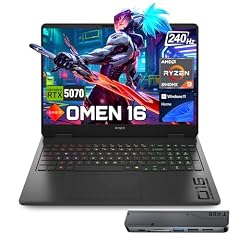
HP Omen RTX 5070 AMD Ryzen 9 8940HX 240Hz Gaming Laptop
- CPU
- AMD Ryzen 9 8940HX
- GPU
- RTX 5070
- GPU memory
- 8 GB
- RAM
- 32 GB
- Storage
- 2000 GB
- Screen
- 16 in
- Refresh
- 240 Hz
- Weight
- 2.45 kg
$2,249.00 price as of 2026-10-09 17:21 UTC (Details)
The HP Omen pairs an AMD Ryzen 9 8940HX with an RTX 5070 and 8GB of graphics memory. Its 2TB SSD doubles the base storage of the 1TB picks in this guide, which helps when engines and build outputs pile up. The 16-inch screen states a 240Hz refresh rate and the weight is 2.45kg.
Pros
- 2TB SSD for engines and project builds
- 32GB of RAM
- RTX 5070 with 8GB of graphics memory
- Stated 240Hz refresh rate
Cons
- 8GB of graphics memory is not the highest available here
- At 2.45kg it is heavier than the lightest picks
Good fit if
- A developer who wants 2TB of storage from the start
- A programmer who wants an AMD Ryzen 9 with an RTX 5070
Skip if
- You want more than 8GB of graphics memory
- You need the lightest laptop in this guide
Verdict: A 16-inch pick with 2TB of storage, 32GB of RAM, and an 8GB RTX 5070.
7 16GB graphics memory on a 240Hz panel
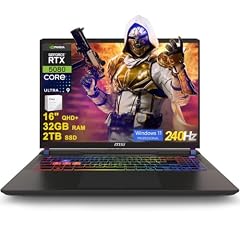
msi Vector 16 HX AI Gaming Laptop 16" QHD+ IPS 240Hz Intel 24-core Ultra
- CPU
- Intel Core Ultra 9 275HX
- GPU
- GeForce RTX 5080
- GPU memory
- 16 GB
- RAM
- 32 GB
- Storage
- 2000 GB
- Screen
- 16 in
- Refresh
- 240 Hz
- OS
- Windows 11 Pro
$2,969.08 price as of 2026-10-09 17:22 UTC (Details)
The MSI Vector 16 HX is one of the picks with 16GB of graphics memory, using an RTX 5080. It combines that with 32GB of RAM and 2TB of storage on a 16-inch 240Hz panel. The listing states Windows 11 Pro but does not give a weight.
Pros
- 16GB of graphics memory on the RTX 5080
- 2TB SSD
- 32GB of RAM
- Stated 240Hz refresh rate
Cons
- No weight stated by the seller
- 32GB of RAM is below the 64GB picks in this guide
Good fit if
- A developer who wants 16GB of graphics memory for larger scenes
- A programmer who needs 2TB of storage and a 240Hz panel
Skip if
- You need a stated weight for travel planning
- You want 64GB of RAM
Verdict: A high-VRAM pick with 16GB of graphics memory and 2TB of storage.
8 64GB of RAM with a 16GB GPU

msi Vector A16 HX 16" QHD+ 240Hz Gaming Laptop
- CPU
- AMD Ryzen 9 8940HX
- GPU
- GeForce RTX 5080
- GPU memory
- 16 GB
- RAM
- 64 GB
- Storage
- 2000 GB
- Screen
- 16 in
- Refresh
- 240 Hz
- Weight
- 2.7 kg
$3,348.99 price as of 2026-10-09 17:22 UTC (Details)
The MSI Vector A16 HX pairs an AMD Ryzen 9 8940HX with an RTX 5080 and 16GB of graphics memory. It also has 64GB of RAM and 2TB of storage on a 16-inch 240Hz panel. The listing states Windows 11 Pro and a 2.7kg weight.
Pros
- 64GB of RAM, the second-highest tier in this guide
- 16GB of graphics memory on the RTX 5080
- 2TB SSD
- Stated 240Hz refresh rate
Cons
- 2.7kg is heavier than several picks here
- 16-inch panel is not the largest in this guide
Good fit if
- A developer who wants 64GB of RAM for many build tools at once
- A programmer who wants a 16GB GPU on an AMD Ryzen machine
Skip if
- You want a lighter machine for daily travel
- You need 4TB of storage or more
Verdict: A 64GB AMD pick with 16GB of graphics memory and room for heavy multitasking.
9 Lightest pick in this guide

Lenovo ThinkPad P1 Gen 7
- CPU
- Intel Core Ultra 7
- GPU
- RTX 3000 Ada
- GPU memory
- 8 GB
- RAM
- 32 GB
- Screen
- 16 in
- Weight
- 1.86 kg
$2,999.70 price as of 2026-10-09 17:22 UTC (Details)
The ThinkPad P1 lists a weight of 1.86kg, the lightest in this guide, which makes it a reasonable companion for a developer who carries their machine to meetings, class, or another desk. It still has 32GB of RAM and an RTX 3000 Ada with 8GB of graphics memory. The listing does not state an operating system.
Pros
- 1.86kg, the lightest weight stated in this guide
- 32GB of RAM
- RTX 3000 Ada with 8GB of graphics memory
- 16-inch screen
Cons
- Operating system not stated by the seller
- 8GB of graphics memory is below the higher-VRAM picks
Good fit if
- A developer who values portability and needs 32GB of RAM
- A programmer who wants a 16-inch screen in a lighter body
Skip if
- You need more than 8GB of graphics memory
- You want the operating system stated in the listing
Verdict: The lightest pick here, with 32GB of RAM and a workstation-class GPU.
10 12GB graphics memory in a 17.3-inch workstation

Dell Precision 7780 Mobile Workstation 17.3" FHD
- CPU
- Intel Core i9-13950HX
- GPU
- RTX 4000 Ada
- GPU memory
- 12 GB
- RAM
- 32 GB
- Storage
- 2000 GB
- Screen
- 17.3 in
- OS
- Windows 11 Pro
$2,799.99 price as of 2026-10-09 17:21 UTC (Details)
The Dell Precision 7780 is a 17.3-inch workstation with 32GB of RAM, a 2TB SSD, and an RTX 4000 Ada with 12GB of graphics memory. Its screen size and storage make it a candidate for a fixed desk setup with occasional movement. The listing states Windows 11 Pro but does not give a weight.
Pros
- 17.3-inch screen, the largest class in this guide
- 12GB of graphics memory on the RTX 4000 Ada
- 2TB SSD
- 32GB of RAM
Cons
- No weight stated by the seller
- 32GB of RAM is below the 64GB picks here
Good fit if
- A developer who wants a 17.3-inch screen and 12GB of graphics memory
- Someone who prefers a workstation-class GPU
Skip if
- You need a stated weight for travel planning
- You want 64GB or more of RAM
Verdict: A large-screen workstation with 12GB of graphics memory and 2TB of storage.
11 24GB graphics memory and 4TB storage

Eluktronics HYDROC 16 G2R RTX 5090 Gaming Laptop
- CPU
- Intel Core Ultra 9 290HX
- GPU
- RTX 5090
- GPU memory
- 24 GB
- RAM
- 64 GB
- Storage
- 4000 GB
- Screen
- 16 in
- Refresh
- 300 Hz
- Weight
- 2.83 kg
$6,999.00 price as of 2026-10-09 17:21 UTC (Details)
The Eluktronics HYDROC 16 sits at the top of this guide for graphics memory: an RTX 5090 with 24GB, tied with one other pick. It also has 64GB of RAM, a 4TB SSD, and a 16-inch 300Hz Mini LED panel. The listing states Windows 11 Pro and a 2.83kg weight.
Pros
- 24GB of graphics memory, tied for the most in this guide
- 64GB of RAM
- 4TB SSD, tied for the largest storage in this guide
- Stated 300Hz refresh rate
Cons
- 2.83kg is heavier than many picks here
- Overkill for 2D or web-based game work
Good fit if
- A developer doing heavy 3D scenes, local model work, or large builds
- A programmer who wants maximum graphics memory and storage
Skip if
- You need a lighter laptop for regular travel
- Your work does not need this much GPU memory
Verdict: A top-spec pick with 24GB of graphics memory, 64GB of RAM, and 4TB of storage.
12 Most RAM here

Lenovo ThinkPad P16 Gen 3 Intel Core Ultra 9 275HX
- CPU
- Intel Core Ultra 9 275HX
- GPU
- RTX PRO 5000
- GPU memory
- 24 GB
- RAM
- 128 GB
- Storage
- 4000 GB
- Screen
- 16 in
- Refresh
- 120 Hz
- Weight
- 2.54 kg
$8,299.00 price as of 2026-10-09 17:22 UTC (Details)
The ThinkPad P16 Gen 3 is the only pick in this guide with 128GB of RAM, which gives a game developer the most room for editors, engines, containers, and virtual machines at once. It also has an RTX PRO 5000 with 24GB of graphics memory and a 4TB SSD. The listing states a 2.54kg weight but no operating system.
Pros
- 128GB of RAM, the most in this guide
- 24GB of graphics memory on the RTX PRO 5000
- 4TB SSD
- Stated 2.54kg weight
Cons
- Operating system not stated by the seller
- 128GB of RAM is more than most game builds will need
Good fit if
- A developer running many containers, virtual machines, and build servers on one machine
- A programmer who wants a top-end workstation-class GPU
Skip if
- You prefer a lighter or smaller laptop
- You do not need 128GB of RAM
Verdict: The highest-RAM pick in this guide, with 24GB of graphics memory and 4TB of storage.
13 64GB of RAM in a lighter workstation

HP ZBook X G1i Laptop
- CPU
- Intel Core Ultra 7 265H
- GPU
- RTX PRO 1000
- GPU memory
- 8 GB
- RAM
- 64 GB
- Storage
- 2000 GB
- Screen
- 16 in
- Weight
- 2.04 kg
- Battery
- 83 Wh
$5,099.00 price as of 2026-10-09 17:22 UTC (Details)
The HP ZBook X G1i combines 64GB of RAM with an RTX PRO 1000 with 8GB of graphics memory and a 2TB SSD. Its stated 2.04kg weight makes it one of the lighter 16-inch workstations in this guide. The listing states Windows 11 Pro and an 83Wh battery.
Pros
- 64GB of RAM
- 8GB of graphics memory on the RTX PRO 1000
- 2TB SSD
- Stated 2.04kg weight
Cons
- 8GB of graphics memory is lower than the 12GB, 16GB, and 24GB picks
- RTX PRO 1000 is a workstation-class card, not the top gaming GPU here
Good fit if
- A developer who wants 64GB of RAM in a lighter 16-inch chassis
- A programmer who needs a workstation GPU with 8GB of graphics memory
Skip if
- You need 12GB or more of graphics memory for heavy scenes
- You are looking for the largest screen in this guide
Verdict: A lighter 16-inch workstation with 64GB of RAM, an 8GB RTX PRO 1000, and 2TB of storage.
14 18-inch screen with 12GB graphics memory

ASUS ROG Strix G18 18” Gaming Laptop
- CPU
- Intel Core Ultra 9 275HX
- GPU
- RTX 5070 Ti
- GPU memory
- 12 GB
- RAM
- 32 GB
- Storage
- 2000 GB
- Screen
- 18 in
- Refresh
- 240 Hz
- Weight
- 3 kg
$3,199.99 price as of 2026-10-09 17:20 UTC (Details)
The ASUS ROG Strix G18 is the 18-inch option in this guide with an RTX 5070 Ti and 12GB of graphics memory. It pairs 32GB of RAM with a 2TB SSD and a stated 240Hz refresh rate. The listing gives a weight of 3kg and does not state an operating system.
Pros
- 18-inch screen, the largest class in this guide
- 12GB of graphics memory on the RTX 5070 Ti
- 2TB SSD
- 32GB of RAM
Cons
- 3kg is the heavier end of this guide
- Operating system not stated by the seller
Good fit if
- A developer who wants a large 18-inch screen for viewport work
- A programmer who needs 12GB of graphics memory and 2TB of storage
Skip if
- You need a laptop that is easy to carry daily
- You want the operating system confirmed in the listing
Verdict: A large 18-inch pick with 12GB of graphics memory, 32GB of RAM, and 2TB of storage.
Side by side
| # | Laptop | CPU | GPU | GPU memory | Rentable GPU model | RAM | Storage |
|---|---|---|---|---|---|---|---|
| 1 | Lenovo Legion 5a Gaming Laptop | AMD Ryzen 7 250 | GeForce RTX 5060 | 8 GB | not stated | 32 GB | 1000 GB |
| 2 | HP Victus 15.6" Gaming Laptop | AMD Ryzen 7 7445HS | GeForce RTX 4050 | 6 GB | not stated | 32 GB | 1000 GB |
| 3 | ASUS TUF Gaming A16 Laptop 16" WUXGA 165Hz 100% sRGB AMD 8-core Ryzen 7 | AMD Ryzen 7 7735HS | Radeon RX 7700S | 8 GB | not stated | 32 GB | 1000 GB |
| 4 | Lenovo Legion 5 16" WQXGA 240Hz Gaming Laptop | Intel Core Ultra 9 275HX | GeForce RTX 5060 | 8 GB | not stated | 32 GB | 1000 GB |
| 5 | acer Predator Helios Neo 16S AI Gaming Laptop | Intel Core Ultra 9 275HX | GeForce RTX 5070 Ti | 12 GB | not stated | 32 GB | 1000 GB |
| 6 | HP Omen RTX 5070 AMD Ryzen 9 8940HX 240Hz Gaming Laptop | AMD Ryzen 9 8940HX | RTX 5070 | 8 GB | not stated | 32 GB | 2000 GB |
| 7 | msi Vector 16 HX AI Gaming Laptop 16" QHD+ IPS 240Hz Intel 24-core Ultra | Intel Core Ultra 9 275HX | GeForce RTX 5080 | 16 GB | not stated | 32 GB | 2000 GB |
| 8 | msi Vector A16 HX 16" QHD+ 240Hz Gaming Laptop | AMD Ryzen 9 8940HX | GeForce RTX 5080 | 16 GB | not stated | 64 GB | 2000 GB |
| 9 | Lenovo ThinkPad P1 Gen 7 | Intel Core Ultra 7 | RTX 3000 Ada | 8 GB | not stated | 32 GB | not stated |
| 10 | Dell Precision 7780 Mobile Workstation 17.3" FHD | Intel Core i9-13950HX | RTX 4000 Ada | 12 GB | not stated | 32 GB | 2000 GB |
| 11 | Eluktronics HYDROC 16 G2R RTX 5090 Gaming Laptop | Intel Core Ultra 9 290HX | RTX 5090 | 24 GB | not stated | 64 GB | 4000 GB |
| 12 | Lenovo ThinkPad P16 Gen 3 Intel Core Ultra 9 275HX | Intel Core Ultra 9 275HX | RTX PRO 5000 | 24 GB | not stated | 128 GB | 4000 GB |
| 13 | HP ZBook X G1i Laptop | Intel Core Ultra 7 265H | RTX PRO 1000 | 8 GB | not stated | 64 GB | 2000 GB |
| 14 | ASUS ROG Strix G18 18” Gaming Laptop | Intel Core Ultra 9 275HX | RTX 5070 Ti | 12 GB | not stated | 32 GB | 2000 GB |
How we picked
Game development relies on two resources in plain view: system memory for the editor, browser, and build tools you keep open, and graphics memory for the scenes and models you work on. The pool for this guide contains 113 priced listings that match the article's rule: 32GB of RAM or more and a graphics card with 6GB of graphics memory or more. From that pool, 14 laptops were selected and compared on the stated specifications: CPU, GPU, graphics memory, RAM, storage, screen size, refresh rate, weight, and operating system. The information comes from each listing; no site member has physically worked with these laptops. Prices are live and read from the listing at the time the page is generated, so they can change.
How to choose
What game development asks of RAM
A game development machine runs an editor, an engine, a browser, and often a build process or local server at the same time. More RAM leaves more room for those to stay open without closing one to start another. Every laptop in this guide starts at 32GB, and several offer 64GB or 128GB. Choose the higher capacities if you expect to keep many heavy tools running together.
When the GPU matters for code and when it does not
The GPU matters when your work includes a 3D viewport, shaders, local machine learning experiments, or any tool that uses graphics memory. The amount of graphics memory limits how large a model or scene the card can hold. Laptops in this guide state between 6GB and 24GB of graphics memory. For engine work that is not GPU-heavy, the lower end of that range may be enough, but the larger cards give more room for ambitious scenes.
Storage for engines, projects, and build output
Game engines, source assets, build caches, container images, and virtual machine disks all take space. The picks in this guide start at 1TB, with several at 2TB and a few at 4TB. If you work on several projects at once or keep local machine learning datasets, a larger drive means less time moving projects to external storage.
Screen size and weight when you carry it
Screens in this guide range from 15.1 inches to 18 inches. A larger screen gives more room for the editor and a browser side by side, while a smaller machine tends to be easier to carry. The selected picks range from 1.86kg to 3kg in stated weight. Match the size to whether the laptop mostly sits on a desk or moves with you.
Operating system and the tools around it
Most picks in this guide list Windows 11 or Windows 11 Pro, with a few listings that do not state an operating system. The catalogue cannot tell you which tools will run on a particular machine. For exact engine or tool requirements, check the official system requirements page from the software vendor.
What this guide leaves out (and why)
This guide is built from the specifications in each listing: CPU, GPU, graphics memory, RAM, storage, screen size, refresh rate, weight, and operating system. It does not cover keyboard feel, trackpad quality, display comfort, fan noise, or build quality, because the catalogue does not include that data. The site does not guess at those qualities, and no one on staff has physically worked with these laptops.
Questions
How much RAM do I need for game development?
This guide starts at 32GB because the pool rule demands it; more RAM leaves more room for editors, engines, and tools open at once. The 64GB and 128GB picks in this guide are for heavier multitasking. The catalogue cannot tell you what a specific project will need, so choose more RAM if you expect to keep many heavy tools running together.
Why does graphics memory matter for game development?
Graphics memory is the VRAM on the GPU. It limits how large a scene, texture set, or local model the card can hold at once. The picks here range from 6GB to 24GB. For 3D viewport work and local machine learning experiments, larger graphics memory gives more headroom. A laptop with no discrete GPU was not eligible for this guide.
Does this guide cover Linux or keyboard comfort?
No. The catalogue has no data on keyboard feel, trackpad, display comfort, fan noise, or build quality, so this guide does not guess about them. It also does not claim that any laptop runs Linux well or supports dual boot; the listings only state the operating system that comes with the machine. Check the maker's support pages for operating system and driver information.
Can these laptops run the latest game engines?
The site does not run software trials, so this guide cannot promise that a specific engine runs on a specific laptop. The picks were chosen from stated specifications: all have 32GB or more of RAM and a GPU with 6GB or more of graphics memory. That is the pool rule for this article. For exact engine requirements, see the engine maker's official system requirements.
Why are some laptops missing a listed weight or operating system?
Some sellers list a weight or operating system and some do not. This guide reports only what the catalogue states. If a box says the operating system or weight is not stated by the seller, that is because the listing did not include it. It is not a guess. If you need that detail, check the maker's spec page for the model before buying.
How are prices handled?
Prices are shown on the page and update with the listing. This article does not quote prices or rank laptops by price, because prices can change. The picks are chosen from the specifications in the pool file, not from price tiers.
Recent updates
- : First published.