
Best Laptops for Computer Science Students in 2026
For a computer science student, the Lenovo V14 G5 is the most balanced pick here: it states 32GB of RAM, a 1TB SSD, a 14-inch screen and a 1.37kg weight, leaving room for an editor, a browser, a local database and containers while staying easy to carry. The 14 picks below come from a pool of 85 student-budget laptops with at least 16GB of RAM, using only the specifications each seller states; no machine was tested.
14 picks from 84 laptops that match this guide with a price we can quote today. Every price below is live and carries the moment it was read.
The picks at a glance
Which one should you buy?
- For a student who keeps an editor, a browser and a container open: The Lenovo V14 G5 carries 32GB of RAM and a 1TB SSD, so a database, a container and reference tabs have room to run beside the editor. See pick 1
- For a student who will run local virtual machines and large datasets: The MECHREVO Dragon 15K states 64GB of RAM and a 4TB SSD, the most of any pick here for local services and storage. See pick 7
- For a student whose coursework touches machine learning or 3D engines: The HP Victus lists a discrete GeForce RTX 4050 with 6GB of graphics memory, the highest stated VRAM figure in this guide. See pick 6
- For a student who carries the laptop between campus and a cafe: The Lenovo LOQ is the lightest pick at 1.36kg and still states a discrete GPU, which suits a daily carry with optional graphics headroom. See pick 4
The 14 picks
1 Top pick for most computer science students

Lenovo V14 G5 14" FHD Anti-Glare Laptop for Home & Work
- CPU
- Intel Core 7 240H
- RAM
- 32 GB
- Storage
- 1000 GB
- Screen
- 14 in
- Weight
- 1.37 kg
- Battery
- 47 Wh
- OS
- Windows 11 Home
$969.99 price as of 2026-10-09 17:22 UTC (Details)
The V14 G5 pairs 32GB of RAM with a 1TB SSD in a 14-inch, 1.37kg body. That gives a student room for an editor, browser tabs, a local database and container work without making the daily carry feel heavy. Windows 11 Home is stated in the listing.
Pros
- 32GB of RAM, a top memory tier in this list
- 1TB SSD for repositories, VM disks and datasets
- 14-inch screen and 1.37kg weight make it easy to carry
- Windows 11 Home is stated by the seller
Cons
- No discrete GPU is stated by the seller
- 512GB and 1TB options mean storage is fixed at the listed size
Good fit if
- Students doing web, systems or data coursework who want a light 14-inch machine
- Anyone who will move between home, class and a cafe
Skip if
- Students whose coursework needs a discrete GPU
- Students who prefer a 15.6-inch or larger screen
Verdict: The Lenovo V14 G5 is the most balanced computer science pick in this list.
2 Best large touchscreen with 32GB

Dell 16 Plus Touchscreen Laptop
- CPU
- Intel Core 7 150U
- RAM
- 32 GB
- Storage
- 1000 GB
- Screen
- 16 in
- Touchscreen
- Yes
- Weight
- 1.94 kg
- OS
- Windows 11 Home
$899.99 price as of 2026-10-09 17:21 UTC (Details)
The Dell 16 Plus combines a 16-inch touchscreen, 32GB of RAM and a 1TB SSD. The larger display gives more room to keep code and documentation side by side, and the touchscreen is stated in the listing.
Pros
- 32GB of RAM
- 16-inch touchscreen
- 1TB SSD
- Windows 11 Home is stated by the seller
Cons
- 1.94kg weight is heavier than the 14-inch picks
- No discrete GPU is stated by the seller
Good fit if
- Students who want a large touchscreen for note-taking and side-by-side code
- Those who prefer a 16-inch display and can carry the weight
Skip if
- Students who need the lightest possible daily carry
- Students whose coursework depends on a discrete GPU
Verdict: A large 32GB option that trades portability for screen space.
3 Best traditional 15.6-inch with 32GB

HP 255 G10 15.6" FHD Business Laptop
- CPU
- AMD Ryzen 7 7730U
- RAM
- 32 GB
- Storage
- 1000 GB
- Screen
- 15.6 in
- Weight
- 1.52 kg
- OS
- Windows 11 Pro
$999.99 price as of 2026-10-09 17:21 UTC (Details)
The HP 255 G10 states 32GB of RAM, a 1TB SSD and a 1.52kg weight, which is light for a 15.6-inch laptop. It is a straightforward choice for coursework that needs memory headroom without a flashy design.
Pros
- 32GB of RAM
- 1TB SSD
- 1.52kg weight for a 15.6-inch body
- Windows 11 Pro is stated by the seller
Cons
- No discrete GPU is stated by the seller
- 15.6-inch screen is the same size as many other picks
Good fit if
- CS students who want a standard 15.6-inch laptop with plenty of RAM
- Students doing web, database and systems work without GPU-heavy projects
Skip if
- Students who want a 14-inch or smaller machine
- Students who need a discrete GPU for machine learning or 3D work
Verdict: A balanced 15.6-inch pick with 32GB of RAM and a light body.
4 Lightest pick in this list

Lenovo LOQ 15.6" Full HD Gaming Laptop
- CPU
- AMD Ryzen 5 7235HS
- GPU
- GeForce RTX 4050
- RAM
- 16 GB
- Storage
- 512 GB
- Screen
- 15.6 in
- Weight
- 1.36 kg
$999.00 price as of 2026-10-09 17:22 UTC (Details)
The LOQ is the lightest pick in this guide at 1.36kg and it also states a discrete GeForce RTX 4050. That unusual combination makes it a candidate for students who want GPU headroom without a heavy machine.
Pros
- 1.36kg, the lightest stated weight in this list
- Discrete GeForce RTX 4050 is stated
- 15.6-inch screen
- 512GB SSD for coursework files
Cons
- 16GB of RAM leaves less room for many containers and VMs at once
- 512GB storage is the smaller tier in this guide
- Operating system is not stated by the seller
Good fit if
- Students who carry the laptop all day but want optional GPU power
- Those doing introductory 3D or game engine work
Skip if
- Students who need 32GB or more for virtual machines and large datasets
- Anyone who wants a stated operating system in the listing
Verdict: An exceptionally light laptop with a discrete GPU, with RAM and storage left at 16GB and 512GB.
5 Only RTX 50 Series GPU here

acer Nitro V 15.6" FHD IPS 165Hz Gaming Notebook Intel Core i5-13420H
- CPU
- Intel Core i5-13420H
- GPU
- GeForce RTX 5050
- RAM
- 16 GB
- Storage
- 512 GB
- Screen
- 15.6 in
- Refresh
- 165 Hz
- Weight
- 1.75 kg
$989.99 price as of 2026-10-09 17:20 UTC (Details)
The Nitro V is the only pick whose listing states a GeForce RTX 50 Series GPU, the RTX 5050. It pairs that GPU with 16GB of RAM and a 512GB SSD, so it suits coursework where a discrete GPU is useful.
Pros
- GeForce RTX 5050 is stated, the only RTX 50 Series GPU in this list
- 165Hz display is stated by the seller
- 16GB of RAM
- 512GB SSD
Cons
- 16GB of RAM limits how many containers and VMs can run at once
- 512GB SSD fills quickly with large project files
- Operating system is not stated by the seller
Good fit if
- Students who want a discrete GPU for machine learning, 3D or game coursework
- Those who also play games outside of class
Skip if
- Students who need more than 16GB of RAM
- Students who want the lightest possible laptop
Verdict: A 15.6-inch pick with the only RTX 50 Series GPU in this list, at the cost of 16GB of RAM.
6 Most stated graphics memory here

HP Victus 15.6 inch FHD 144Hz Gaming Laptop Intel Core i5-13420H NVIDIA
- CPU
- Intel Core i5-13420H
- GPU
- GeForce RTX 4050
- GPU memory
- 6 GB
- RAM
- 16 GB
- Storage
- 512 GB
- Screen
- 15.6 in
- Refresh
- 144 Hz
- Weight
- 2.33 kg
$969.00 price as of 2026-10-09 17:22 UTC (Details)
The HP Victus states 6GB of graphics memory, the most of any pick with a stated VRAM figure. It combines a GeForce RTX 4050 with a 144Hz 15.6-inch display, making it a strong candidate for GPU-focused coursework.
Pros
- 6GB of graphics memory, the highest stated VRAM in this list
- GeForce RTX 4050 discrete GPU
- 144Hz display is stated by the seller
- Windows 11 Home is stated by the seller
Cons
- 2.33kg is the heaviest stated weight in this list
- Only 16GB of RAM
- 512GB SSD is small for GPU project files
Good fit if
- Students whose coursework touches machine learning or 3D and want more graphics memory
- Those who can carry a heavier gaming-style laptop
Skip if
- Anyone who needs a light commuting laptop
- Students who want 32GB of system RAM
Verdict: The pick with the most stated graphics memory, but it is heavy and limited to 16GB of RAM.
7 Most RAM and largest storage here

MECHREVO Dragon 15K 165HZ Gaming Laptop
- CPU
- AMD Ryzen 7 7445HS
- GPU
- RTX 4050
- RAM
- 64 GB
- Storage
- 4000 GB
- Screen
- 15.6 in
- Refresh
- 165 Hz
- Weight
- 2.1 kg
$899.99 price as of 2026-10-09 17:22 UTC (Details)
The Dragon 15K is the outlier for heavy workloads: it states 64GB of RAM and a 4TB SSD, plus a discrete GeForce RTX 4050. That configuration covers local databases, containers, VM disks and large datasets without external drives.
Pros
- 64GB of RAM, the most in this list
- 4TB SSD, the largest storage in this list
- Discrete RTX 4050 is stated
- 165Hz display is stated by the seller
Cons
- 2.1kg weight is heavy to carry daily
- Operating system is not stated by the seller
- 15.6-inch screen is standard rather than large
Good fit if
- Students running many containers, virtual machines and local services at once
- Those who want one machine that will not run out of storage quickly
Skip if
- Students who prioritize portability
- Anyone who only needs a light coursework machine
Verdict: The heavy-lift pick for students who expect to run everything locally.
8 Best 15.6-inch touchscreen with 32GB
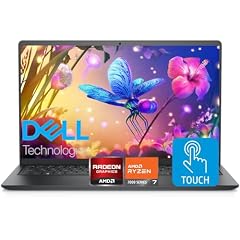
Dell Inspiron 15.6" FHD Touchscreen Laptop
- CPU
- AMD Ryzen 7 7730U
- RAM
- 32 GB
- Storage
- 1000 GB
- Screen
- 15.6 in
- Touchscreen
- Yes
- OS
- Windows 11 Pro
$919.00 price as of 2026-10-09 17:21 UTC (Details)
The Dell Inspiron lists 32GB of RAM, a 1TB SSD and a touchscreen with Ryzen 7 7730U. It is a mid-size option for students who want a touch display without moving to a 16-inch body.
Pros
- 32GB of RAM
- 1TB SSD
- Touchscreen is stated by the seller
- Windows 11 Pro is stated by the seller
Cons
- Weight is not stated by the seller
- No discrete GPU is stated by the seller
Good fit if
- Students who want a touchscreen and 32GB in a conventional 15.6-inch laptop
- Those who prefer a Windows 11 Pro listing
Skip if
- Students who need a stated weight to plan daily carrying
- Students who need a discrete GPU
Verdict: A solid 32GB touchscreen option if the missing weight is not a concern.
9 Best 32GB pick for large local storage

Lenovo 15.6 FHD Laptop
- CPU
- Intel Core i7-13620H
- RAM
- 32 GB
- Storage
- 2000 GB
- Screen
- 15.6 in
- Weight
- 1.65 kg
- OS
- Windows 11 Home
$999.99 price as of 2026-10-09 17:22 UTC (Details)
This Lenovo pairs 32GB of RAM with a 2TB SSD, giving a student room for large repositories, VM disks and container image caches. The 15.6-inch screen and 1.65kg weight keep it within the usual coursework laptop range.
Pros
- 2TB SSD, more storage than most picks
- 32GB of RAM
- 15.6-inch screen
- Windows 11 Home is stated by the seller
Cons
- No discrete GPU is stated by the seller
- 1.65kg weight is not the lightest in this list
Good fit if
- Students who keep many large projects and data files on the local drive
- Those running virtual machines with big disk images
Skip if
- Students who need a dedicated GPU
- Students who want a lighter or smaller machine
Verdict: A 32GB laptop built around storage.
10 Largest storage among 16GB picks

ASUS Vivobook 16" WUXGA Laptop
- CPU
- Intel Core i7-1355U
- RAM
- 16 GB
- Storage
- 2000 GB
- Screen
- 16 in
- OS
- Windows 11 Pro
$999.00 price as of 2026-10-09 17:21 UTC (Details)
The Vivobook 16 states 16GB of RAM and 2TB of storage, making it the largest storage option among the 16GB picks here. Its 16-inch screen is useful for side-by-side code and documentation.
Pros
- 2TB storage, the most among the 16GB picks in this list
- 16-inch screen
- Windows 11 Pro is stated by the seller
- Intel Iris Xe graphics are stated by the seller
Cons
- 16GB of RAM, less than the 32GB and 64GB picks
- Weight is not stated by the seller
- No discrete GPU is stated
Good fit if
- Students who want abundant local storage and a large screen
- Those whose work is mostly editor, browser and repositories
Skip if
- Students who need 32GB RAM for VMs and containers
- Anyone who needs a stated weight
Verdict: A big-screen, big-storage 16GB choice for coursework that stays on the local drive.
11 Lightest 15.6-inch Windows pick

Samsung Galaxy Book4 Edge Laptop
- CPU
- Qualcomm Snapdragon X
- RAM
- 16 GB
- Screen
- 15.6 in
- Weight
- 1.5 kg
- OS
- Windows 11 Home
$799.98 price as of 2026-10-09 17:23 UTC (Details)
The Galaxy Book4 Edge lists a Snapdragon X processor, 16GB of RAM and a 1.5kg weight in a 15.6-inch body. It is one of the lighter machines here and shows the ARM-based Windows option in this budget window.
Pros
- 1.5kg weight is among the lightest 15.6-inch picks
- 15.6-inch screen
- Windows 11 Home is stated by the seller
- 512GB SSD
Cons
- 16GB of RAM, the lower tier in this guide
- No discrete GPU is stated by the seller
- 512GB SSD is the smaller storage tier in this list
Good fit if
- Students who want a light 15.6-inch Windows laptop for commuting
- Those curious about an ARM-based Windows machine in this budget window
Skip if
- Students who need 32GB or more of RAM
- Students who need a discrete GPU
Verdict: A light 15.6-inch Windows pick, but with 16GB and no stated GPU.
12 Largest screen here

HP 17 Inch FHD Laptop Computer for Business & Students 16GB RAM 1TB SSD
- CPU
- AMD Ryzen 5 7430U
- RAM
- 16 GB
- Storage
- 1000 GB
- Screen
- 17 in
- OS
- Windows 11 Pro
$779.99 price as of 2026-10-09 17:21 UTC (Details) Typical price: $807.90, 5% off
The HP 17 Inch is the only pick with a 17-inch screen in this guide. It pairs that display with 16GB of RAM and a 1TB SSD, giving a student a large canvas for code, terminals and documentation on one machine.
Pros
- 17-inch screen, the largest in this list
- 1TB SSD
- 16GB of RAM
- Windows 11 Pro is stated by the seller
Cons
- Weight is not stated by the seller
- 16GB of RAM, less than the 32GB and 64GB picks
- No discrete GPU is stated
Good fit if
- Students who value a large screen and will leave the laptop on a desk
- Those who want 1TB of storage without stepping up to 32GB
Skip if
- Students who carry the laptop to class daily
- Students who need a discrete GPU
Verdict: A big-screen 17-inch option for desk-based coursework.
13 Best 2-in-1 convertible

Lenovo IdeaPad 5 2-in-1 Convertible Laptop
- CPU
- AMD Ryzen 7 8845HS
- GPU
- Radeon 780M
- RAM
- 16 GB
- Storage
- 512 GB
- Screen
- 16 in
- Touchscreen
- Yes
- Battery
- 57 Wh
- OS
- Windows 11 Home
$869.99 price as of 2026-10-09 17:22 UTC (Details)
The IdeaPad 5 is a convertible 2-in-1 with a 16-inch WUXGA IPS touchscreen and a stated Radeon 780M integrated GPU. It is the only convertible in this guide, which suits students who want a touchscreen in a flexible form.
Pros
- 2-in-1 convertible design
- 16-inch WUXGA IPS touchscreen
- 16GB of RAM
- Radeon 780M graphics are stated by the seller
Cons
- 512GB SSD is smaller than several picks
- 16GB of RAM limits multitasking headroom
- Weight is not stated by the seller
Good fit if
- Students who want a touchscreen laptop they can also use in tablet-like positions
- Those who prefer a 16-inch screen with integrated graphics
Skip if
- Students who need more system RAM or storage
- Students who want a stated weight for carrying
Verdict: A convertible 16-inch option for students who want a touchscreen and are okay with 16GB and 512GB.
14 Best 14-inch workstation pick

Dell Precision 3000 3480 14" Mobile Workstation
- CPU
- Intel Core i7-1370P
- RAM
- 32 GB
- Storage
- 512 GB
- Screen
- 14 in
- Weight
- 1.5 kg
$989.21 price as of 2026-10-09 17:21 UTC (Details)
The Dell Precision 3000 is a 14-inch mobile workstation with 32GB of RAM and an Intel Core i7-1370P. It is the only pick named as a workstation, which can matter for students who want a business-class 14-inch machine.
Pros
- 32GB of RAM
- 14-inch screen
- 1.5kg stated weight
- Workstation-style configuration is stated in the name
Cons
- 512GB SSD, the smaller storage tier in this guide
- No discrete GPU is stated by the seller
Good fit if
- Students who want 32GB and a 14-inch screen from a workstation line
- Those who prefer a stated weight
Skip if
- Students who need more than 512GB of local storage
- Those who want a discrete GPU
Verdict: A compact 14-inch workstation-style pick with 32GB of RAM.
Side by side
| # | Laptop | CPU | GPU | GPU memory | Rentable GPU model | RAM | Storage |
|---|---|---|---|---|---|---|---|
| 1 | Lenovo V14 G5 14" FHD Anti-Glare Laptop for Home & Work | Intel Core 7 240H | not stated | not stated | not stated | 32 GB | 1000 GB |
| 2 | Dell 16 Plus Touchscreen Laptop | Intel Core 7 150U | not stated | not stated | not stated | 32 GB | 1000 GB |
| 3 | HP 255 G10 15.6" FHD Business Laptop | AMD Ryzen 7 7730U | not stated | not stated | not stated | 32 GB | 1000 GB |
| 4 | Lenovo LOQ 15.6" Full HD Gaming Laptop | AMD Ryzen 5 7235HS | GeForce RTX 4050 | not stated | not stated | 16 GB | 512 GB |
| 5 | acer Nitro V 15.6" FHD IPS 165Hz Gaming Notebook Intel Core i5-13420H | Intel Core i5-13420H | GeForce RTX 5050 | not stated | not stated | 16 GB | 512 GB |
| 6 | HP Victus 15.6 inch FHD 144Hz Gaming Laptop Intel Core i5-13420H NVIDIA | Intel Core i5-13420H | GeForce RTX 4050 | 6 GB | not stated | 16 GB | 512 GB |
| 7 | MECHREVO Dragon 15K 165HZ Gaming Laptop | AMD Ryzen 7 7445HS | RTX 4050 | not stated | not stated | 64 GB | 4000 GB |
| 8 | Dell Inspiron 15.6" FHD Touchscreen Laptop | AMD Ryzen 7 7730U | not stated | not stated | not stated | 32 GB | 1000 GB |
| 9 | Lenovo 15.6 FHD Laptop | Intel Core i7-13620H | not stated | not stated | not stated | 32 GB | 2000 GB |
| 10 | ASUS Vivobook 16" WUXGA Laptop | Intel Core i7-1355U | not stated | not stated | not stated | 16 GB | 2000 GB |
| 11 | Samsung Galaxy Book4 Edge Laptop | Qualcomm Snapdragon X | not stated | not stated | not stated | 16 GB | not stated |
| 12 | HP 17 Inch FHD Laptop Computer for Business & Students 16GB RAM 1TB SSD | AMD Ryzen 5 7430U | not stated | not stated | not stated | 16 GB | 1000 GB |
| 13 | Lenovo IdeaPad 5 2-in-1 Convertible Laptop | AMD Ryzen 7 8845HS | Radeon 780M | not stated | not stated | 16 GB | 512 GB |
| 14 | Dell Precision 3000 3480 14" Mobile Workstation | Intel Core i7-1370P | not stated | not stated | not stated | 32 GB | 512 GB |
How we picked
The pool for this article contained 85 laptop listings within the student budget window. The shortlist rule for this article is that a listing must state 16GB of RAM or more. From that set, 14 laptops were chosen to cover a range of memory from 16GB to 64GB, storage from 512GB to 4TB, screen sizes from 14 to 17 inches, and a mix of integrated, discrete and unstated GPUs. All specifications come from the seller listings, and no unit was opened, tested, benchmarked or used by anyone at this site. The prices on this page are live and shown with the time they were read.
How to choose
What your editor, browser and containers ask of RAM
Computer science coursework often means an editor, a browser with reference tabs, a local database and a container or virtual machine running at the same time. The amount of memory in the laptop sets how comfortably those can sit side by side. Every pick in this guide states 16GB or more, and several step up to 32GB or 64GB. If you expect to keep several of those workloads open, a 32GB pick such as the Lenovo V14 G5 or the Dell 16 Plus gives more headroom than a 16GB machine.
When the GPU matters for code and when it does not
A discrete GPU matters for coursework that involves machine learning, 3D graphics or game engines. For most web, systems and data work, the GPU is not the deciding spec; the CPU, RAM and storage do more work. The amount of graphics memory on a laptop limits how large a model or scene the card can hold, so a pick such as the HP Victus with 6GB of stated graphics memory offers more room for that kind of work than a laptop with no stated GPU. If you are not doing that work, a laptop with integrated graphics or no stated GPU may be all you need.
Storage for repositories, images and virtual machines
Source trees, package dependencies, container images, virtual machine disks and datasets take space quickly. A 512GB SSD is workable for a semester, but a 1TB or 2TB drive leaves room for several large projects at once. If you want to keep virtual machines or datasets local, look at the picks with larger storage: the laptops with 1TB, 2TB or 4TB in this list. More storage also means less time deciding what to delete before an install.
Screen size and weight when you carry it
A 14-inch laptop such as the Lenovo V14 G5 or Dell Precision 3000 is easier to carry between classes, while a 16-inch or 17-inch screen gives more room for code and documentation side by side. Weight matters on the same commute: the Lenovo LOQ is the lightest pick at 1.36kg, while the HP Victus and MECHREVO are over 2kg. Choose the screen that fits your desk and backpack before adding size for its own sake.
Operating systems and development tools
The listings in this guide state Windows 11 Home or Pro, or do not state an operating system. Windows is a common platform for course tools, and both Visual Studio Code and Docker Desktop have published setup pages for it. If a listing does not state an OS, check the seller's description before relying on it for a course that requires a particular system. This guide does not rank one OS above another because the catalog does not contain the data to support that.
What this guide leaves out (and why)
This guide is based on the specifications in each listing. It does not cover keyboard feel, trackpad quality, display brightness, fan noise, build quality or battery life, because the catalog does not state those details and nobody on the site has used these laptops. The same applies to Linux compatibility: there is no data in the listings, so we do not guess. Use the live page price and the stated specs to narrow the list, then check the full listing for anything this guide cannot measure.
Questions
Is 16GB of RAM enough for computer science coursework?
Seven of the fourteen picks here state 16GB, six state 32GB and one states 64GB. For coursework that is mostly an editor, a browser and small local services, 16GB can be enough. More RAM leaves more room for a database, containers or virtual machines to run at the same time as those tools. If you expect to run several heavy workloads, choose a 32GB or 64GB pick from this guide.
Does this guide cover keyboard quality or battery life?
The catalog does not include physical details such as keyboard feel, trackpad quality, fan noise, display brightness, or battery life in hours. It also does not state Linux compatibility. All picks are based on the specifications sellers provide, and this guide does not guess at details the listings omit.
Can I run Linux on these laptops?
The catalog does not state Linux compatibility for any pick in this guide, so we do not make claims about it. Several listings state Windows 11 Home or Pro, and some do not state an operating system at all. If your courses require Linux tools, check the listing and the maker's support pages before deciding. This guide only reports what the seller states.
Do I need a discrete GPU for computer science?
A discrete GPU is not required for most programming coursework. It becomes relevant for machine learning, 3D graphics and game engine work, where the amount of graphics memory limits how large a model or scene the card can hold. Picks such as the Acer Nitro V, Lenovo LOQ, HP Victus and MECHREVO state a discrete GPU. If your modules do not use those workloads, the other picks are likely enough.
Are the prices on this page current?
Prices are shown on the page with the time they were read from the current listing, and they can change after that moment. This guide does not quote price amounts in the text for that reason. The live price on the page, next to each pick, is the number to use when comparing your shortlist before you buy.
What should I check in a listing before buying?
The catalog gives you RAM, storage, GPU, screen size, weight and operating system when the seller states them. Before buying, look for the missing pieces in the full listing: whether the operating system is stated, whether the weight matters for your commute, and whether the storage meets the size of the projects you plan to keep locally. The guide cannot verify anything beyond the stated specifications.
Recent updates
- : First published.