
Best Laptops for Data Science and Machine Learning in 2026
The Lenovo ThinkPad P16 Gen 3 with an Intel Core Ultra 9, 128GB of RAM and 24GB of graphics memory leads this guide for data science and machine learning. Its memory capacity leaves room for large datasets, local models and virtual environments side by side. Every pick below was selected from a pool of 50 listings, using only the specifications stated by the seller and the maker's published information.
14 picks from 46 laptops that match this guide with a price we can quote today. Every price below is live and carries the moment it was read.
The picks at a glance
Which one should you buy?
- For a data scientist with notebooks, a database and a container open: The Dell Precision 7780 with 128GB of RAM and an RTX 3500 Ada with 12GB of graphics memory gives you room for exploratory notebooks, a local database and containerized services at the same time. See pick 5
- For someone training local machine learning models: The Lenovo ThinkPad P16 Gen 3 pairs 128GB of system memory with 24GB of graphics memory on the RTX PRO 5000, which leaves the most graphics memory in this list for holding larger models and scenes. See pick 1
- For a student running coursework on a laptop they carry to class: The Acer Predator Helios Neo 16S states a 2.3 kg weight, the lightest 16-inch machine here, while keeping 32GB of RAM and 12GB of graphics memory for coursework. See pick 14
- For an engineer who keeps large repositories and model weights on one drive: The Eluktronics HYDROC 16 G2R states 4TB of storage, the most in this list, with 64GB of RAM and 24GB of graphics memory for local work. See pick 3
The 14 picks
1 Best overall for data science and machine learning

Lenovo ThinkPad P16 Gen 3 Intel Core Ultra 9 275HX
- CPU
- Intel Core Ultra 9 275HX
- GPU
- RTX PRO 5000
- GPU memory
- 24 GB
- RAM
- 128 GB
- Storage
- 4000 GB
- Screen
- 16 in
- Refresh
- 120 Hz
- Weight
- 2.54 kg
$8,299.00 price as of 2026-10-09 17:22 UTC (Details)
The ThinkPad P16 Gen 3 states 128GB of RAM, the most system memory in this list, and 24GB of graphics memory on the RTX PRO 5000. That combination gives the largest headroom in this guide for large datasets, local model work and many processes at once.
Pros
- 128GB of RAM, the most in this list
- 24GB of graphics memory, tied for the most here
- 4TB of storage, tied for the most here
- 16-inch 120Hz display
Cons
- No operating system stated by the seller
- 2.54 kg weight is heavier than some other picks
Good fit if
- You work with large datasets and want maximum RAM headroom
- You want a mobile workstation-class GPU with 24GB of graphics memory
Skip if
- You need a stated Windows installation from the listing
- You want a lighter laptop for daily commuting
Verdict: The strongest spec sheet in this list for RAM, graphics memory and storage.
2 Most balanced workstation configuration

Lenovo ThinkPad P16 Gen 3
- CPU
- Intel Core Ultra 9 285HX
- GPU
- RTX PRO 4000
- GPU memory
- 16 GB
- RAM
- 128 GB
- Storage
- 4000 GB
- Screen
- 16 in
- Refresh
- 120 Hz
- Touchscreen
- Yes
$7,699.00 price as of 2026-10-09 17:22 UTC (Details)
This second ThinkPad P16 Gen 3 states 128GB of RAM, 4TB of storage and 16GB of graphics memory on the RTX PRO 4000. It sits between the RTX PRO 5000 model and several gaming-GPU picks, with Windows 11 Pro listed.
Pros
- 128GB of RAM, tied for the most in this list
- RTX PRO 4000 with 16GB of graphics memory
- 4TB of storage, tied for the most here
- Windows 11 Pro stated by the seller
Cons
- 16GB of graphics memory is less than the 24GB cards on some other picks
- 2.54 kg weight is above the lightest machines here
Good fit if
- You want a workstation GPU with ISV-oriented naming and Windows 11 Pro listed
- You need 128GB of RAM and 4TB of storage together
Skip if
- You want the maximum 24GB of graphics memory
- You prefer a lighter machine for travel
Verdict: A large-memory workstation with a strong GPU for local workloads.
3 Most storage here

Eluktronics HYDROC 16 G2R RTX 5090 Gaming Laptop
- CPU
- Intel Core Ultra 9 290HX
- GPU
- RTX 5090
- GPU memory
- 24 GB
- RAM
- 64 GB
- Storage
- 4000 GB
- Screen
- 16 in
- Refresh
- 300 Hz
- Weight
- 2.83 kg
$6,999.00 price as of 2026-10-09 17:21 UTC (Details)
The Eluktronics HYDROC 16 G2R states 4TB of storage, tied for the most in the pool, with 64GB of RAM and 24GB of graphics memory on the RTX 5090. For repositories, container images, virtual machine disks and model weights, this is the highest-capacity pick.
Pros
- 4TB of storage, tied for the most in this list
- 24GB of graphics memory, tied for the most here
- 64GB of RAM
- 300Hz display
Cons
- 2.83 kg weight is among the heavier picks
- No operating system stated by the seller
Good fit if
- You keep large datasets, images and virtual machines on the internal drive
- You want the highest available graphics memory and storage combined
Skip if
- You want a lighter laptop for frequent carrying
- You need a seller-stated operating system
Verdict: The pick for large local storage plus serious GPU memory.
4 Most RAM for the graphics memory

Lenovo ThinkPad P16 Gen 3 with Ultra 9 285HX vPro 24-Core
- CPU
- Intel Core Ultra 9 285HX
- GPU
- RTX PRO 3000
- GPU memory
- 12 GB
- RAM
- 128 GB
- Storage
- 4000 GB
- Screen
- 16 in
- Refresh
- 120 Hz
- Weight
- 2.54 kg
$6,299.00 price as of 2026-10-09 17:22 UTC (Details)
This ThinkPad P16 Gen 3 configures 128GB of RAM with an RTX PRO 3000 that has 12GB of graphics memory. It is one of the 128GB options in this list with a workstation GPU, and it keeps the pool's minimum graphics memory.
Pros
- 128GB of RAM, tied for the most in this list
- 4TB of storage, tied for the most here
- Windows 11 Pro stated by the seller
- 2.54 kg weight with a 16-inch screen
Cons
- 12GB of graphics memory is the minimum in this guide
- A workstation GPU with 12GB is less headroom for larger local models than 16GB or 24GB cards here
Good fit if
- You prioritize system RAM over graphics memory
- You want a Windows 11 Pro workstation with maximum RAM
Skip if
- Your work depends on more than 12GB of graphics memory
- You want a lighter laptop
Verdict: Maximum system memory with a lower graphics-memory tier.
5 Best workstation for memory-heavy data work

Dell Precision 7780 Mobile Workstation 17.3" FHD Laptop
- CPU
- Intel Core i9-13950HX
- GPU
- RTX 3500 Ada
- GPU memory
- 12 GB
- RAM
- 128 GB
- Storage
- 1000 GB
- Screen
- 17.3 in
- OS
- Windows 11 Pro
$4,899.21 price as of 2026-10-09 17:21 UTC (Details)
The Dell Precision 7780 states 128GB of RAM and an RTX 3500 Ada with 12GB of graphics memory on a 17.3-inch screen. It is a mobile workstation option for data cleaning, notebooks and large in-memory processing.
Pros
- 128GB of RAM, tied for the most in this list
- 17.3-inch screen, among the largest here
- Windows 11 Pro stated by the seller
- RTX 3500 Ada workstation GPU
Cons
- 1TB of storage is less than several other picks
- 12GB of graphics memory is the minimum in this guide
- Weight not stated by the seller
Good fit if
- You want a large-screen workstation for data processing
- You need 128GB of RAM in a Dell Precision form factor
Skip if
- You need more than 1TB of internal storage
- You want a lighter laptop for travel
Verdict: A 17-inch workstation for memory-heavy data work.
6 Best large-screen workstation with 32GB of RAM

Dell Precision 7780 Mobile Workstation 17.3" FHD
- CPU
- Intel Core i9-13950HX
- GPU
- RTX 4000 Ada
- GPU memory
- 12 GB
- RAM
- 32 GB
- Storage
- 2000 GB
- Screen
- 17.3 in
- OS
- Windows 11 Pro
$2,799.99 price as of 2026-10-09 17:21 UTC (Details)
The Dell Precision 7780 with 32GB of RAM and an RTX 4000 Ada with 12GB of graphics memory combines a 17.3-inch screen and 2TB of storage. It is a useful workstation option when the extra RAM of other picks is not required.
Pros
- 17.3-inch screen, among the largest here
- RTX 4000 Ada with 12GB of graphics memory
- 2TB of storage
- Windows 11 Pro stated by the seller
Cons
- 32GB of RAM is the entry point in this list
- 12GB of graphics memory is the minimum in this guide
Good fit if
- You want a large-screen mobile workstation
- You need 32GB of RAM with a workstation GPU
Skip if
- You need 64GB or more RAM for very large datasets
- You want a lighter laptop
Verdict: A solid large-screen workstation with 32GB of RAM.
7 Most storage among 128GB workstations

Dell Precision 7780 Laptop
- CPU
- Intel Core i9-13950HX
- GPU
- RTX 3500 Ada
- GPU memory
- 12 GB
- RAM
- 128 GB
- Storage
- 4000 GB
- Screen
- 17.3 in
- Weight
- 3.05 kg
- OS
- Windows 11 Pro
$6,299.99 price as of 2026-10-09 17:21 UTC (Details)
This Dell Precision 7780 pairs 128GB of RAM with 4TB of storage and an RTX 3500 Ada with 12GB of graphics memory. For memory-heavy work that also needs large local storage, it is the version of the 17-inch workstation with the most drive space.
Pros
- 128GB of RAM, tied for the most in this list
- 4TB of storage, tied for the most here
- 17.3-inch screen
- Windows 11 Pro stated by the seller
Cons
- 12GB of graphics memory is the minimum in this guide
- 3.05 kg weight is among the heaviest picks
Good fit if
- You need both 128GB of RAM and 4TB of storage
- You want a large-screen workstation for local data
Skip if
- You want to keep the weight down
- You need more than 12GB of graphics memory
Verdict: Maximum RAM and maximum storage in one large workstation.
8 Best 64GB gaming-class pick for local GPU work

Lenovo Legion Pro 7i Gen 10 16" Gaming Laptop
- CPU
- Intel Core Ultra 9 275HX
- GPU
- GeForce RTX 5080
- GPU memory
- 16 GB
- RAM
- 64 GB
- Storage
- 2000 GB
- Screen
- 16 in
- Refresh
- 240 Hz
- OS
- Windows 11 Pro
$4,398.00 price as of 2026-10-09 17:22 UTC (Details)
The Lenovo Legion Pro 7i Gen 10 states 64GB of RAM, 2TB of storage and a GeForce RTX 5080 with 16GB of graphics memory. It pairs a large amount of system memory with a current-generation NVIDIA GPU for local model work.
Pros
- 64GB of RAM
- 16GB of graphics memory on the RTX 5080
- 2TB of storage
- Windows 11 Pro stated by the seller
Cons
- 16GB of graphics memory is below the 24GB cards in this list
- 2.57 kg weight is not the lightest
Good fit if
- You want 64GB of RAM and a current GeForce GPU
- You prefer a 16-inch gaming-class laptop for local GPU work
Skip if
- You need 24GB of graphics memory
- You want the lightest laptop in this guide
Verdict: A strong 64GB GeForce RTX 5080 option for local machine learning.
9 Most storage on a 64GB GeForce RTX 5080

msi Vector 16 HX AI 16" QHD+ 240Hz Gaming Laptop
- CPU
- Intel Core Ultra 9 275HX
- GPU
- GeForce RTX 5080
- GPU memory
- 16 GB
- RAM
- 64 GB
- Storage
- 4000 GB
- Screen
- 16 in
- Refresh
- 240 Hz
- Weight
- 2.7 kg
$6,699.00 price as of 2026-10-09 17:22 UTC (Details)
The MSI Vector 16 HX AI states 64GB of RAM, 4TB of storage and a GeForce RTX 5080 with 16GB of graphics memory. It combines the large storage tier of this guide with a 16-inch 240Hz screen.
Pros
- 4TB of storage, tied for the most in this list
- 64GB of RAM
- 16GB of graphics memory on the RTX 5080
- Windows 11 Pro stated by the seller
Cons
- 16GB of graphics memory is below the 24GB cards here
- 2.7 kg weight is on the heavier side
Good fit if
- You need 4TB of storage alongside 64GB of RAM
- You want a GeForce RTX 5080 with ample system memory
Skip if
- You need 24GB of graphics memory
- You prefer a lighter laptop
Verdict: A high-capacity 64GB laptop with a current GeForce GPU.
10 Best AMD-based 64GB pick

msi Vector A16 HX 16" QHD+ 240Hz Gaming Laptop
- CPU
- AMD Ryzen 9 8940HX
- GPU
- GeForce RTX 5080
- GPU memory
- 16 GB
- RAM
- 64 GB
- Storage
- 2000 GB
- Screen
- 16 in
- Refresh
- 240 Hz
- Weight
- 2.7 kg
$3,348.99 price as of 2026-10-09 17:22 UTC (Details)
The MSI Vector A16 HX states an AMD Ryzen 9 8940HX, 64GB of RAM, 2TB of storage and a GeForce RTX 5080 with 16GB of graphics memory. It is one of the AMD options in a list otherwise dominated by Intel chips.
Pros
- 64GB of RAM
- AMD Ryzen 9 8940HX listed
- 16GB of graphics memory on the RTX 5080
- Windows 11 Pro stated by the seller
Cons
- 16GB of graphics memory is below the 24GB cards here
- 2.7 kg weight
Good fit if
- You prefer an AMD Ryzen processor for your data stack
- You want 64GB of RAM and a GeForce RTX 5080
Skip if
- You need 24GB of graphics memory
- You want a lighter laptop
Verdict: The AMD route to 64GB of RAM and an RTX 5080.
11 Best 17-inch GeForce RTX 4090 pick

GIGABYTE - AORUS 17X
- CPU
- Intel Core i9-14900HX
- GPU
- GeForce RTX 4090
- GPU memory
- 16 GB
- RAM
- 32 GB
- Storage
- 2000 GB
- Screen
- 17.3 in
- Refresh
- 240 Hz
- Weight
- 2.8 kg
$3,432.45 price as of 2026-10-09 17:21 UTC (Details)
The GIGABYTE AORUS 17X states a GeForce RTX 4090 with 16GB of graphics memory, 32GB of RAM and 2TB of storage on a 17.3-inch 240Hz screen. It is a large-screen option with a previous-generation flagship GPU.
Pros
- 17.3-inch 240Hz screen
- 16GB of graphics memory on the RTX 4090
- 2TB of storage
- Windows 11 Home stated by the seller
Cons
- 32GB of RAM is the entry point in this list
- 2.8 kg weight is on the heavier side
Good fit if
- You want a 17-inch GeForce RTX 4090 laptop
- You need 32GB of RAM with a large display
Skip if
- You want 64GB or more RAM
- You prefer a lighter 16-inch machine
Verdict: A large-screen GeForce RTX 4090 pick for local GPU work.
12 Best 5TB storage pick
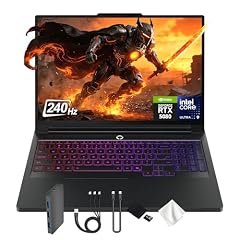
Lenovo Legion Pro 7i 16" WQXGA 240Hz Gaming Laptop
- CPU
- Intel Core Ultra 9 275HX
- GPU
- GeForce RTX 5080
- GPU memory
- 16 GB
- RAM
- 32 GB
- Storage
- 4000 GB
- Screen
- 16 in
- Refresh
- 240 Hz
- Weight
- 2.57 kg
$4,949.00 price as of 2026-10-09 17:22 UTC (Details)
The Lenovo Legion Pro 7i states 5TB of storage, the largest amount in this guide, with 32GB of RAM and a GeForce RTX 5080 with 16GB of graphics memory. For datasets and images that outgrow 4TB, this is the capacity pick.
Pros
- 5TB of storage, the most in this list
- 16GB of graphics memory on the RTX 5080
- 16-inch 240Hz screen
- Windows 11 Pro stated by the seller
Cons
- 32GB of RAM is the entry point in this list
- Weight not stated by the seller
Good fit if
- You need more than 4TB of internal storage for data and models
- You want a GeForce RTX 5080 with a 16-inch screen
Skip if
- You need 64GB or more RAM
- You want a lighter laptop with a stated weight
Verdict: The largest storage capacity in this guide.
13 Best 18-inch 24GB graphics memory pick

Lenovo Legion 9i 18" WQUXGA IPS 240Hz Gaming Notebook Intel Core Ultra 9
- CPU
- Intel Core Ultra 9 290HX
- GPU
- GeForce RTX 5090
- GPU memory
- 24 GB
- RAM
- 64 GB
- Storage
- 2000 GB
- Screen
- 18 in
- Refresh
- 240 Hz
- Weight
- 3.49 kg
$6,099.99 price as of 2026-10-09 17:22 UTC (Details)
The Lenovo Legion 9i 18 states 64GB of RAM, 2TB of storage and a GeForce RTX 5090 with 24GB of graphics memory on an 18-inch screen. It is the largest screen among the picks with the top graphics memory tier.
Pros
- 24GB of graphics memory, tied for the most here
- 64GB of RAM
- 18-inch screen, the largest in this guide
- Windows 11 Home stated by the seller
Cons
- 3.49 kg weight, the heaviest in this list
- 2TB of storage is less than several other picks
Good fit if
- You want an 18-inch screen with 24GB of graphics memory
- You need 64GB of RAM in a large gaming-class laptop
Skip if
- You need to carry the laptop frequently
- You want more than 2TB of storage
Verdict: The biggest screen combined with the top graphics memory tier.
14 Best 16-inch portable pick

acer Predator Helios Neo 16S AI Gaming Laptop
- CPU
- Intel Core Ultra 9 275HX
- GPU
- GeForce RTX 5070 Ti
- GPU memory
- 12 GB
- RAM
- 32 GB
- Storage
- 1000 GB
- Screen
- 16 in
- Refresh
- 240 Hz
- Weight
- 2.3 kg
The Acer Predator Helios Neo 16S states a 2.3 kg weight, the lightest 16-inch machine in this guide, with 32GB of RAM, a GeForce RTX 5070 Ti with 12GB of graphics memory and 1TB of storage. It keeps the pool's required specs in a more portable body.
Pros
- 2.3 kg weight, the lightest 16-inch pick here
- 32GB of RAM
- 12GB of graphics memory on the RTX 5070 Ti
- Windows 11 Pro stated by the seller
Cons
- 1TB of storage is the least in this guide
- 12GB of graphics memory is the minimum here
Good fit if
- You carry the laptop between class, office and home
- You want 32GB of RAM with a lighter chassis
Skip if
- You need more than 1TB of storage
- You need more than 12GB of graphics memory
Verdict: The most portable pick that still meets the 32GB and 12GB rules.
Side by side
| # | Laptop | CPU | GPU | GPU memory | Rentable GPU model | RAM | Storage |
|---|---|---|---|---|---|---|---|
| 1 | Lenovo ThinkPad P16 Gen 3 Intel Core Ultra 9 275HX | Intel Core Ultra 9 275HX | RTX PRO 5000 | 24 GB | not stated | 128 GB | 4000 GB |
| 2 | Lenovo ThinkPad P16 Gen 3 | Intel Core Ultra 9 285HX | RTX PRO 4000 | 16 GB | not stated | 128 GB | 4000 GB |
| 3 | Eluktronics HYDROC 16 G2R RTX 5090 Gaming Laptop | Intel Core Ultra 9 290HX | RTX 5090 | 24 GB | not stated | 64 GB | 4000 GB |
| 4 | Lenovo ThinkPad P16 Gen 3 with Ultra 9 285HX vPro 24-Core | Intel Core Ultra 9 285HX | RTX PRO 3000 | 12 GB | not stated | 128 GB | 4000 GB |
| 5 | Dell Precision 7780 Mobile Workstation 17.3" FHD Laptop | Intel Core i9-13950HX | RTX 3500 Ada | 12 GB | not stated | 128 GB | 1000 GB |
| 6 | Dell Precision 7780 Mobile Workstation 17.3" FHD | Intel Core i9-13950HX | RTX 4000 Ada | 12 GB | not stated | 32 GB | 2000 GB |
| 7 | Dell Precision 7780 Laptop | Intel Core i9-13950HX | RTX 3500 Ada | 12 GB | not stated | 128 GB | 4000 GB |
| 8 | Lenovo Legion Pro 7i Gen 10 16" Gaming Laptop | Intel Core Ultra 9 275HX | GeForce RTX 5080 | 16 GB | not stated | 64 GB | 2000 GB |
| 9 | msi Vector 16 HX AI 16" QHD+ 240Hz Gaming Laptop | Intel Core Ultra 9 275HX | GeForce RTX 5080 | 16 GB | not stated | 64 GB | 4000 GB |
| 10 | msi Vector A16 HX 16" QHD+ 240Hz Gaming Laptop | AMD Ryzen 9 8940HX | GeForce RTX 5080 | 16 GB | not stated | 64 GB | 2000 GB |
| 11 | GIGABYTE - AORUS 17X | Intel Core i9-14900HX | GeForce RTX 4090 | 16 GB | not stated | 32 GB | 2000 GB |
| 12 | Lenovo Legion Pro 7i 16" WQXGA 240Hz Gaming Laptop | Intel Core Ultra 9 275HX | GeForce RTX 5080 | 16 GB | not stated | 32 GB | 4000 GB |
| 13 | Lenovo Legion 9i 18" WQUXGA IPS 240Hz Gaming Notebook Intel Core Ultra 9 | Intel Core Ultra 9 290HX | GeForce RTX 5090 | 24 GB | not stated | 64 GB | 2000 GB |
| 14 | acer Predator Helios Neo 16S AI Gaming Laptop | Intel Core Ultra 9 275HX | GeForce RTX 5070 Ti | 12 GB | not stated | 32 GB | 1000 GB |
How we picked
The pool contained 50 listings that state at least 32GB of RAM and a graphics card with at least 12GB of graphics memory. We kept the group rule as the shortlist rule: each pick states 32GB of RAM or more and a GPU with 12GB of graphics memory or more. From those, we chose 14 laptops that cover the work of data science and machine learning: cleaning data, training local models, running notebooks, containers and virtual machines, and carrying the machine between office and campus. Nobody on the site tested or measured any unit. Prices are live and read from the store listing; specifications come from the listing and from maker sources.
How to choose
What RAM does for data science and machine learning
The pool for this guide starts at 32GB of RAM, and several picks go to 64GB or 128GB. More RAM leaves more room for an editor, a browser with many tabs, a local database, notebook kernels, containers and virtual machines to run at the same time. When you are cleaning a large dataset in memory or training a model that keeps part of its state on the CPU, the extra headroom can mean fewer interruptions and less time managing what is open.
When the GPU matters for code and when it does not
The second rule of this guide is a graphics card with at least 12GB of graphics memory. That amount of graphics memory limits how large a local model or scene the card can hold, as a general fact. For training and inference on your own laptop, more graphics memory gives more room for the weights and activations of a model. For plain data cleaning, notebooks and web services, the GPU matters less, and the main benefit of these laptops is that they also carry 32GB or more of RAM.
Storage for repositories, images and datasets
Machine learning work can accumulate large files: datasets, model weights, container images, virtual machine disks and package caches. The picks here range from 1TB to 5TB of internal storage. If you keep most of your work in the cloud or on a server, a smaller drive is fine. If you train locally or work on an airplane, a 4TB or 5TB drive gives you room to keep several projects on the machine at once.
Screen size and weight when you carry it
The pool includes 16-inch, 17.3-inch and 18-inch laptops. Larger screens show more code and more notebook panels beside a browser, but they also tend to be heavier. The lightest 16-inch pick here states 2.3 kg, while the 18-inch models reach 3.49 kg. If the laptop goes from a desk to a lab or a classroom every day, the weight difference is worth checking against your backpack.
Operating system and local development
The listings state Windows 11 Pro, Windows 11 Home, or no operating system at all. If your team's data stack assumes a particular OS, or you need Windows-specific drivers for a GPU feature, look for a pick whose seller states that version. Laptops without a stated operating system are noted in this guide; you would need to install the OS you plan to use.
What this guide leaves out
The catalogue cannot tell us about keyboard feel, trackpad comfort, fan noise, build quality, battery life in hours, or how a given framework performs on a given laptop. No one on the site has tested these units. We also cannot verify Linux compatibility or driver support from the listing data. Use this guide as a spec-level starting point, and check the maker's own pages for anything the listing does not state.
Questions
Why do these laptops have at least 32GB of RAM and 12GB of graphics memory?
The shortlist rule for this guide is exactly that: every pick states at least 32GB of RAM and a graphics card with at least 12GB of graphics memory. Data science and machine learning benefit from RAM for notebooks, databases, containers and virtual machines, and from graphics memory for local model work. A machine below that line may still work for lighter tasks, but it is outside the scope of this guide.
Is more graphics memory always better for machine learning?
Generally, more graphics memory lets a card hold a larger model or scene before the work needs to spill to system memory or be split differently. The picks include 12GB, 16GB and 24GB options. Your choice should match the size of models you actually plan to run locally. If your training happens on a remote server or cluster, a smaller graphics memory amount may be enough.
Can I use these laptops for general programming too?
Yes. The same specifications that suit data science and machine learning also cover web development, backend services, and systems work: 32GB or more of RAM, a capable CPU, large storage and a discrete GPU. The laptop will not be the bottleneck for typical coding tasks. The main trade-off is that these machines are larger and heavier than many general-purpose ultraportables.
Does this guide cover keyboards, battery life or Linux support?
No. The catalogue has no data on keyboard feel, trackpad comfort, fan noise, build quality or battery life in hours, and the site does not guess. It also cannot verify Linux compatibility or driver support from the listing. For those questions, use the maker's specifications and support pages, or check the laptop after you have a chance to use it.
Why is there no Mac in this guide?
The pool for this guide was built with a filter that requires 32GB of RAM and a graphics card with 12GB of graphics memory. The listings that matched are all Windows or unspecified operating system laptops from PC makers. Apple's unified memory models are outside the filter, and this guide only makes picks from the pool it was given.
Recent updates
- : First published.