
Best Programming Laptops Under $1300 in 2026: 14 Picks
The Dell Precision 3490 is the top pick for this budget: it pairs 32GB of memory with a 1TB SSD in a 14-inch body that weighs 1.4kg, so an editor, browser, containers and a local database have room to run together. This guide narrows 34 listings with 16GB or more of RAM to 14 picks, using only the specifications stated by each seller and maker.
14 picks from 33 laptops that match this guide with a price we can quote today. Every price below is live and carries the moment it was read.
The picks at a glance
Which one should you buy?
- For a React developer with a browser, an editor and a container open: A 32GB Dell Precision 3490 leaves room for a heavy editor, many browser tabs and a container running side by side, without forcing you to close one process to start another. See pick 1
- For a student whose coursework needs a virtual machine: The 64GB HP 17-inch Touchscreen gives virtual machines room to breathe, and its 2TB SSD holds multiple VM disks and coursework without running out of space. See pick 7
- For an iOS or macOS developer shipping to the App Store: The MacBook Air 15 runs macOS and lists an Apple M5 chip, which makes it the pick here for developers building on Apple platforms. See pick 2
- For someone who carries the laptop between campus and a cafe: At 1.34kg, the Microsoft Surface Laptop is the lightest pick in this guide, so it slips into a bag more easily than the larger Windows machines. See pick 6
The 14 picks
1 Best all-around pick

Dell Precision 3490 Mobile Workstation Laptop
- CPU
- Intel Core Ultra 5 135H
- RAM
- 32 GB
- Storage
- 1000 GB
- Screen
- 14 in
- Weight
- 1.4 kg
- OS
- Windows 11 Pro
$1,299.99 price as of 2026-10-09 17:21 UTC (Details)
This 14-inch workstation has 32GB of memory, a 1TB SSD and a 1.4kg weight, a combination that suits daily programming. The smaller screen keeps it easy to carry while the memory leaves room for an editor, a browser and a database at the same time.
Pros
- 32GB of RAM, double the 16GB floor of this list
- 1TB SSD for repositories and virtual machine disks
- 1.4kg weight, among the lightest Windows picks here
- 14-inch size fits on a cafe table
Cons
- No discrete GPU is stated
- Screen is smaller than the 16-inch picks
Good fit if
- Developers who carry the laptop daily
- Programmers running local containers and databases
Skip if
- Anyone whose work needs a discrete GPU for machine learning
- Those who want a larger screen for side-by-side code and docs
Verdict: A well-balanced programming laptop for daily work at this budget, with 32GB of memory in a light 14-inch frame.
2 Best for macOS and iOS development

Apple 2026 MacBook Air 15-inch Laptop with M5 chip
- CPU
- Apple M5
- RAM
- 16 GB
- Storage
- 512 GB
- Screen
- 15 in
- Weight
- 1.51 kg
- OS
- macOS
$1,299.00 price as of 2026-10-09 17:20 UTC (Details)
This MacBook Air runs macOS with an Apple M5 chip, 16GB of unified memory and 512GB of storage. Apple's developer tools for Apple platforms require macOS, and the 1.51kg weight makes it an easy carry for mobile and desktop developers.
Pros
- macOS is the stated operating system
- Apple M5 chip, as listed
- 15-inch screen in a 1.51kg body
- 512GB SSD
Cons
- 16GB of RAM is the floor here
- 512GB storage is smaller than several Windows picks
- No discrete GPU is stated
Good fit if
- iOS or macOS developers
- Programmers who prefer macOS and want a lighter laptop
Skip if
- Teams that require Windows-only development tools
- Workflows that need 32GB or more of memory
Verdict: The Mac pick for Apple-platform development in this price window, with the operating system and portability that macOS work expects.
3 32GB of RAM with a discrete GPU

HP Victus 15.6" Gaming Laptop
- CPU
- AMD Ryzen 7 7445HS
- GPU
- GeForce RTX 4050
- GPU memory
- 6 GB
- RAM
- 32 GB
- Storage
- 1000 GB
- Screen
- 15.6 in
- Refresh
- 144 Hz
- OS
- Windows 11
$1,299.00 price as of 2026-10-09 17:22 UTC (Details)
This HP combines 32GB of memory with an NVIDIA GeForce RTX 4050 that has 6GB of graphics memory. The 1TB SSD holds large repositories and container images, and the 15.6-inch 144Hz display is roomy for code.
Pros
- 32GB RAM
- RTX 4050 with 6GB of graphics memory
- 1TB SSD
- 144Hz display
Cons
- 2.3kg weight is heavier than the portable picks here
- Windows 11 is the stated OS, so Apple tools need separate hardware
Good fit if
- Developers doing local machine learning or 3D work
- Programmers who want one machine for code and GPU experiments
Skip if
- Anyone who carries the laptop every day and wants a lighter shell
- Developers who prefer a 14-inch laptop
Verdict: A strong balance of memory and GPU for programming work at this budget, with 32GB of RAM and an RTX 4050.
4 Most graphics memory here

Lenovo LOQ 15.6" IPS FHD 144Hz AMD Ryzen 7 250 NVIDIA GeForce RTX 5060
- CPU
- AMD Ryzen 7 250
- GPU
- GeForce RTX 5060
- GPU memory
- 8 GB
- RAM
- 16 GB
- Screen
- 15.6 in
- Refresh
- 144 Hz
- Weight
- 2.39 kg
- OS
- Windows 11 Home
$1,299.99 price as of 2026-10-09 17:22 UTC (Details)
The listing states an RTX 5060 with 8GB of graphics memory, the highest VRAM figure in this list. It also has 16GB of RAM and a 144Hz screen, which makes it a useful machine for local model work where the GPU is the limiting factor.
Pros
- 8GB of graphics memory, the most stated here
- RTX 5060 listed
- 144Hz 15.6-inch display
- Windows 11 Home stated
Cons
- 16GB of RAM is lower than several picks
- 512GB SSD is smaller than many in this list
- Weighs 2.39kg
Good fit if
- Developers who keep local models or GPU experiments on the card
- Programmers who also use game engines or 3D tools
Skip if
- Workflows where RAM matters more than graphics memory
- Anyone who needs more than 512GB of built-in storage
Verdict: The pick with the most stated graphics memory in this budget, at the cost of RAM and storage.
5 32GB in a 16-inch shell

Acer Swift Go 16 AI Copilot+PC Laptop
- CPU
- AMD Ryzen AI 9 465
- RAM
- 32 GB
- Storage
- 1000 GB
- Screen
- 16 in
- Refresh
- 120 Hz
- Touchscreen
- Yes
- Weight
- 1.6 kg
- OS
- Windows 11
$1,229.00 price as of 2026-10-09 17:20 UTC (Details)
This Acer has 32GB of memory, 1TB of storage and a 16-inch touchscreen in a 1.6kg body. Windows 11 is stated, and no discrete GPU is listed, so it suits web and backend work that does not depend on the graphics card.
Pros
- 32GB RAM
- 1TB SSD
- 16-inch touchscreen
- 1.6kg, light for a 16-inch laptop
Cons
- No discrete GPU is stated
- 16-inch body is larger than the 14-inch Dell Precision
Good fit if
- Web and backend developers who want 32GB without a heavy machine
- Programmers who use a touchscreen for diagrams and notes
Skip if
- Machine learning work that needs a discrete GPU
- Developers who prefer a small 14-inch laptop
Verdict: A roomy 32GB Windows laptop that stays relatively light, with no discrete GPU stated.
6 Lightest here

Microsoft Surface Copilot+ PC Laptop
- CPU
- Qualcomm Snapdragon X Plus
- RAM
- 16 GB
- Storage
- 1500 GB
- Screen
- 13.8 in
- Touchscreen
- Yes
- Weight
- 1.34 kg
- OS
- Windows 11
$1,289.00 price as of 2026-10-09 17:22 UTC (Details)
At 1.34kg, this Surface is the lightest pick in this list, with a 13.8-inch touchscreen and 1.5TB of storage. The Snapdragon X Plus CPU and Windows 11 are stated in the listing, and the large SSD leaves room for code and virtual machines.
Pros
- 1.34kg, lightest in this guide
- 1.5TB SSD, more storage than several heavier picks
- 13.8-inch touchscreen
- Windows 11 stated
Cons
- 16GB RAM
- No discrete GPU is stated
- Smaller screen than the 16-inch options
Good fit if
- Students and consultants who move between rooms or sites
- Programmers who prefer a compact touchscreen
Skip if
- Workloads that need 32GB or more
- Developers who want one 16-inch display without an external monitor
Verdict: The most portable Windows pick in this budget, with unusually large storage for its light weight.
7 Most RAM here

HP 17-inch Touchscreen Business Laptop
- CPU
- AMD Ryzen 5 7430U
- RAM
- 64 GB
- Storage
- 2000 GB
- Screen
- 17 in
- Touchscreen
- Yes
- Weight
- 2.22 kg
- OS
- Windows 11 Pro
$1,299.99 price as of 2026-10-09 17:21 UTC (Details)
This HP is the only pick with 64GB of memory and one of two picks with 2TB of storage, which makes it the strongest option for virtual machines, containers and large datasets. The 17-inch touchscreen provides a wide work surface, at the cost of a 2.22kg weight.
Pros
- 64GB RAM, the most in this list
- 2TB SSD, one of two picks with the most storage here
- 17-inch touchscreen
- Windows 11 Pro stated
Cons
- 2.22kg, heavier than most picks
- No discrete GPU is stated
- Large screen means a bigger bag
Good fit if
- Developers running several VMs or containers at once
- Coders who keep large datasets and build caches locally
Skip if
- Anyone who wants a light daily carry
- GPU-heavy machine learning work
Verdict: Maximizes memory in this budget, with a large 2TB drive and an equally large chassis.
8 2TB storage in a 16-inch touchscreen

HP OmniBook 16" 2K Touchscreen Laptop | Intel Core Ultra 7 255U
- CPU
- Intel Core Ultra 7 255U
- RAM
- 32 GB
- Storage
- 2000 GB
- Screen
- 16 in
- Touchscreen
- Yes
- Weight
- 1.64 kg
- OS
- Windows 11
$1,239.99 price as of 2026-10-09 17:21 UTC (Details)
This OmniBook matches the 2TB storage of the larger HP pick in a 16-inch body that weighs 1.64kg. It has 32GB of memory and an Intel Core Ultra 7 255U, plus a touchscreen, which makes it a strong Windows pick for developers who want big storage but not a 17-inch chassis.
Pros
- 2TB SSD
- 32GB RAM
- 16-inch touchscreen
- 1.64kg for a 16-inch laptop
Cons
- No discrete GPU is stated
- Stated OS is Windows 11, not Pro
- Storage size may be more than needed if you use external drives
Good fit if
- Developers with large local repositories and image caches
- Programmers who use touch and a lighter 16-inch shell
Skip if
- Anyone needing a discrete GPU for local models
- Those who specifically want Windows 11 Pro
Verdict: A big-storage, 32GB Windows laptop that keeps weight lower than the 17-inch options.
9 16-inch business pick with 32GB

Dell Pro 16 PC16250 Business Laptop
- CPU
- Intel Core 5 120U
- RAM
- 32 GB
- Storage
- 1000 GB
- Screen
- 16 in
- OS
- Windows 11 Pro
$1,229.99 price as of 2026-10-09 17:21 UTC (Details)
Dell's Pro 16 lists 32GB of memory, a 1TB SSD and a 16-inch display, all under Windows 11 Pro. With no weight stated by the seller, it is a capable stationary or desk-bound pick for programmers who do not need to carry it.
Pros
- 32GB RAM
- 1TB SSD
- 16-inch display
- Windows 11 Pro stated
Cons
- Weight is not stated by the seller
- No discrete GPU is stated
- No touchscreen is stated
Good fit if
- Developers using an external monitor but wanting a large built-in screen
- Programmers in Windows 11 Pro environments
Skip if
- Those who need a known weight for daily carrying
- GPU-accelerated machine learning
Verdict: A straightforward 32GB Windows 11 Pro laptop with a large display, though the seller does not state its weight.
10 AMD ThinkPad with 1TB storage

Lenovo ThinkPad E16 AMD Ryzen 7 7735HS 16GB DDR5 1TB SSD + 500GB HDD
- CPU
- AMD Ryzen 7 7735HS
- GPU
- Radeon 680M
- RAM
- 16 GB
- Storage
- 1000 GB
- Screen
- 16 in
- OS
- Windows 11 Pro
$1,249.98 price as of 2026-10-09 17:22 UTC (Details)
This ThinkPad combines an AMD Ryzen 7 7735HS, 16GB of memory and a 1TB SSD with a 16-inch screen. The Radeon 680M integrated graphics are stated in the listing, so it is aimed at general programming rather than GPU work.
Pros
- 16GB RAM
- 1TB of listed storage
- 16-inch screen
- Windows 11 Pro stated
Cons
- No discrete GPU beyond the stated Radeon 680M
- 16GB RAM is the floor, not a step up
- Weight is not stated by the seller
Good fit if
- Developers who work on Windows and want a large screen
- Programmers who value a known business model line
Skip if
- Workflows that need 32GB
- Anyone who needs a stated weight before buying
Verdict: A roomy Windows 11 Pro laptop with AMD silicon and 1TB of storage, though the listing omits the weight.
11 Compact business pick with 16GB
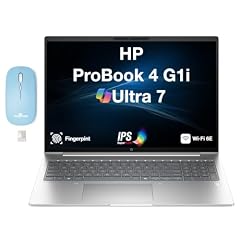
HP ProBook 4 G1i AI Business Laptop 16.0" 60Hz IPS 16GB/512GBSSD/W11P
- CPU
- Intel Core Ultra 7
- RAM
- 16 GB
- Storage
- 512 GB
- Screen
- 16 in
- Refresh
- 60 Hz
- Weight
- 1.72 kg
- Battery
- 56 Wh
- OS
- Windows 11 Pro
$1,267.99 price as of 2026-10-09 17:22 UTC (Details)
The ProBook lists an Intel Core Ultra 7, 16GB of memory and a 512GB SSD in a 16-inch body that weighs 1.72kg. Windows 11 Pro is stated, and the 60Hz display is modest, but for writing code at a desk it leaves room for a browser and terminal.
Pros
- 16GB RAM
- Intel Core Ultra 7 listed
- 1.72kg weight is stated
- Windows 11 Pro stated
Cons
- 512GB SSD is one of the smaller capacities in this guide
- No discrete GPU is stated
- 60Hz display refresh rate is the lowest stated here
Good fit if
- Developers in corporate environments that use Windows 11 Pro
- Programmers with modest storage needs
Skip if
- Anyone storing many virtual machine disks locally
- GPU-heavy development
Verdict: A lighter business Windows 11 Pro pick with a moderate 512GB SSD.
12 Touchscreen Windows laptop with 16GB

HP 15.6" Touchscreen Laptop
- CPU
- Intel Core i7-1355U
- RAM
- 16 GB
- Storage
- 512 GB
- Screen
- 15.6 in
- Touchscreen
- Yes
- Weight
- 1.6 kg
- OS
- Windows 11 Pro
$1,265.99 price as of 2026-10-09 17:21 UTC (Details)
This HP lists an Intel Core i7-1355U, 16GB of memory, a 512GB SSD and a touchscreen in a 1.6kg body. Windows 11 Pro is stated, making it a simple choice for developers who want a touch display and do not need a discrete GPU.
Pros
- 16GB RAM
- 512GB SSD
- 15.6-inch touchscreen
- 1.6kg weight stated
Cons
- 512GB storage is on the low side for local VMs
- No discrete GPU is stated
- 16GB RAM is the floor of this price window
Good fit if
- Developers who use touch and a standard 15.6-inch screen
- Programmers in Windows 11 Pro environments
Skip if
- Workflows that need 32GB
- Local machine learning with large models
Verdict: A touchscreen Windows Pro pick with moderate RAM and storage, fine for everyday code work.
13 16-inch touchscreen with Core Ultra 7

Samsung Galaxy Book6 Business Ai Laptop 2026
- CPU
- Intel Core Ultra 7 355
- RAM
- 16 GB
- Storage
- 512 GB
- Screen
- 16 in
- Refresh
- 120 Hz
- Touchscreen
- Yes
- Weight
- 1.84 kg
- OS
- Windows 11 Pro
$1,299.99 price as of 2026-10-09 17:23 UTC (Details)
Samsung's Book6 lists an Intel Core Ultra 7 355, 16GB of memory, a 16-inch touchscreen and a 120Hz display, with 512GB of storage. Windows 11 Pro is stated, and the 1.84kg weight makes it a reasonable carry for a large touch display.
Pros
- 16-inch touchscreen
- 120Hz display
- Intel Core Ultra 7 355 listed
- Windows 11 Pro stated
Cons
- 16GB RAM
- 512GB SSD
- No discrete GPU is stated
Good fit if
- Developers who want a large touchscreen for code and docs
- Windows 11 Pro users
Skip if
- Anyone who needs more storage headroom
- GPU-heavy work
Verdict: A large 16-inch Windows Pro touchscreen option, with modest RAM and storage for the price window.
14 Light gaming laptop with RTX 5050 and 1TB

msi Cyborg A15 AI 15.6” FHD 144Hz Thin & Light Gaming Laptop
- CPU
- AMD Ryzen 7 260
- GPU
- GeForce RTX 5050
- RAM
- 16 GB
- Storage
- 1000 GB
- Screen
- 15.6 in
- Refresh
- 144 Hz
- Weight
- 1.95 kg
- OS
- Windows 11
$1,220.00 price as of 2026-10-09 17:22 UTC (Details)
This MSI lists an AMD Ryzen 7 260, an RTX 5050, 16GB of memory and 1TB of storage in a 15.6-inch body that weighs 1.95kg. It adds a discrete GPU without going as heavy as some gaming laptops, so it suits developers who also run GPU-accelerated code.
Pros
- RTX 5050 discrete GPU stated
- 1TB SSD
- 1.95kg weight for a gaming laptop
- 144Hz display
Cons
- 16GB RAM
- Graphics memory is not stated by the seller
- Smaller screen than the 16-inch options
Good fit if
- Developers who want a discrete GPU and a lighter body
- Programmers who need 1TB of storage
Skip if
- Workflows that need more than 16GB of RAM
- Anyone who wants a known VRAM figure
Verdict: A discrete-GPU Windows laptop with 1TB storage and a moderate 1.95kg weight, though the graphics memory is not stated.
Side by side
| # | Laptop | CPU | GPU | GPU memory | Rentable GPU model | RAM | Storage |
|---|---|---|---|---|---|---|---|
| 1 | Dell Precision 3490 Mobile Workstation Laptop | Intel Core Ultra 5 135H | not stated | not stated | not stated | 32 GB | 1000 GB |
| 2 | Apple 2026 MacBook Air 15-inch Laptop with M5 chip | Apple M5 | not stated | not stated | not stated | 16 GB | 512 GB |
| 3 | HP Victus 15.6" Gaming Laptop | AMD Ryzen 7 7445HS | GeForce RTX 4050 | 6 GB | not stated | 32 GB | 1000 GB |
| 4 | Lenovo LOQ 15.6" IPS FHD 144Hz AMD Ryzen 7 250 NVIDIA GeForce RTX 5060 | AMD Ryzen 7 250 | GeForce RTX 5060 | 8 GB | not stated | 16 GB | not stated |
| 5 | Acer Swift Go 16 AI Copilot+PC Laptop | AMD Ryzen AI 9 465 | not stated | not stated | not stated | 32 GB | 1000 GB |
| 6 | Microsoft Surface Copilot+ PC Laptop | Qualcomm Snapdragon X Plus | not stated | not stated | not stated | 16 GB | 1500 GB |
| 7 | HP 17-inch Touchscreen Business Laptop | AMD Ryzen 5 7430U | not stated | not stated | not stated | 64 GB | 2000 GB |
| 8 | HP OmniBook 16" 2K Touchscreen Laptop | Intel Core Ultra 7 255U | Intel Core Ultra 7 255U | not stated | not stated | not stated | 32 GB | 2000 GB |
| 9 | Dell Pro 16 PC16250 Business Laptop | Intel Core 5 120U | not stated | not stated | not stated | 32 GB | 1000 GB |
| 10 | Lenovo ThinkPad E16 AMD Ryzen 7 7735HS 16GB DDR5 1TB SSD + 500GB HDD | AMD Ryzen 7 7735HS | Radeon 680M | not stated | not stated | 16 GB | 1000 GB |
| 11 | HP ProBook 4 G1i AI Business Laptop 16.0" 60Hz IPS 16GB/512GBSSD/W11P | Intel Core Ultra 7 | not stated | not stated | not stated | 16 GB | 512 GB |
| 12 | HP 15.6" Touchscreen Laptop | Intel Core i7-1355U | not stated | not stated | not stated | 16 GB | 512 GB |
| 13 | Samsung Galaxy Book6 Business Ai Laptop 2026 | Intel Core Ultra 7 355 | not stated | not stated | not stated | 16 GB | 512 GB |
| 14 | msi Cyborg A15 AI 15.6” FHD 144Hz Thin & Light Gaming Laptop | AMD Ryzen 7 260 | GeForce RTX 5050 | not stated | not stated | 16 GB | 1000 GB |
How we picked
The guide is drawn from a pool of 34 laptop listings within this price window that each state at least 16GB of RAM, per the catalogue rule, and 14 are covered here. Every specification comes from the listing or the maker's own spec sheets; the prices shown on the page are live listing prices read at the time the page loads. Nobody at this site has used, tested or benchmarked these laptops, so the picks rest on stated specs, not experience.
How to choose
What this price window buys a programmer
This price window sits above entry-level machines, so most listings here state 16GB of RAM as a floor. Several go further: the chosen picks include 32GB and 64GB configurations, 1TB and 2TB SSDs, and discrete GPUs from NVIDIA's RTX 40 and 50 series. What you give up is usually a choice between memory, storage, graphics and weight; no single laptop in this range maximizes all of them.
What your editor, browser and containers ask of RAM
When you code, the laptop runs at least an editor, a terminal and a browser with documentation and tabs open. Add a local database or a container and the memory demand climbs. A 16GB machine can handle this for many projects, but a 32GB or 64GB pick leaves more room for those processes to run side by side without you closing one to start another. If your work regularly includes virtual machines, choose the highest RAM you can from the picks above.
When the GPU matters for code and when it does not
Most web, backend and mobile work never uses a discrete GPU. The integrated graphics that ship with most CPUs are enough to drive the display and the operating system. A GPU becomes relevant when you train or run machine-learning models, work in 3D or game engines, or use libraries that accelerate code on the graphics card. Graphics memory limits how large a model or scene the card can hold; the picks in this guide range from no stated GPU to an RTX 5060 with 8GB.
Storage for repositories, images and virtual machines
Source code itself is light, but the things around it are not: dependency caches, container images, virtual machine disks and datasets all take space. If you mostly write code and push to a remote repository, a 512GB SSD is enough. If you keep containers or VMs on the machine, look at the 1TB and 2TB picks in this guide. Several laptops here with 32GB or 64GB of memory also offer the large drives that let you keep those local environments ready to open.
Screen size and weight when you carry it
A 14-inch laptop is easier to take between home, class and the office. A 15.6-inch or 16-inch screen gives you more room for code beside a browser or terminal, and a 17-inch screen is the widest option here but adds bulk. The stated weights in this guide run from 1.34kg for the Surface to 2.65kg for the ASUS ROG Strix, so if you carry the laptop every day, check the weight and screen size together before you choose.
What this guide leaves out (and why)
This guide cannot tell you about keyboard feel, trackpad quality, fan noise, heat, build quality or battery life in hours. The catalogue only gives us the specifications a seller states, not experience. The same is true for Linux compatibility: none of the listings state driver support or dual-boot behavior, so this guide does not guess. Use these picks as a shortlist from stated specs, then check the maker's own pages for the details this guide cannot cover.
Questions
Does this guide cover keyboards or Linux?
No. The catalogue contains only the specifications a seller states, such as RAM, storage, screen size, weight and operating system. It has no data on keyboard feel, trackpad comfort, fan noise, heat, build quality or battery life in hours, and it has no data on Linux driver support or dual-boot behavior. This site does not guess at those qualities, so the picks here are based only on stated specs.
Is 16GB of RAM enough for programming?
For many projects, 16GB is enough to run an editor, a terminal and a browser side by side. It becomes tight when you keep containers, virtual machines or a local database open at the same time. Several laptops in this guide have 32GB or 64GB, so if your workflow already includes those heavier workloads, choose one of those configurations and you will have more room.
Can I use the gaming laptops for machine learning?
The gaming laptops in this guide state discrete NVIDIA GPUs, which are useful for local machine-learning work because graphics memory limits how large a model or scene the card can hold. The catalogue does not promise that any framework or model will run, and it does not provide benchmark results. Treat the discrete GPU as a stated capability, not a measured performance guarantee.
How are the prices kept current?
The price shown next to each pick is read live from the store listing when the page loads. This guide does not use a fixed price in its recommendations, because store prices move. Always check the live price and listing before you buy.
Should I choose Windows or macOS for programming?
The operating system matters most when it is tied to your target platform. Apple's developer tools for iOS and macOS run on macOS, so the MacBook Air in this guide is the pick for that work. Windows laptops in this guide are listed with Windows 11 or Windows 11 Pro, which suits Windows development and general web and backend work. Neither operating system is presented as faster or better; the choice depends on what you build.
Recent updates
- : First published.